virtual try on bangs
Virtual Try on Bangs: A Step-by-Step How-To
Learn how to use virtual try on bangs tools with a clear guide to uploading photos, choosing styles, and exporting results. Start planning your look today.
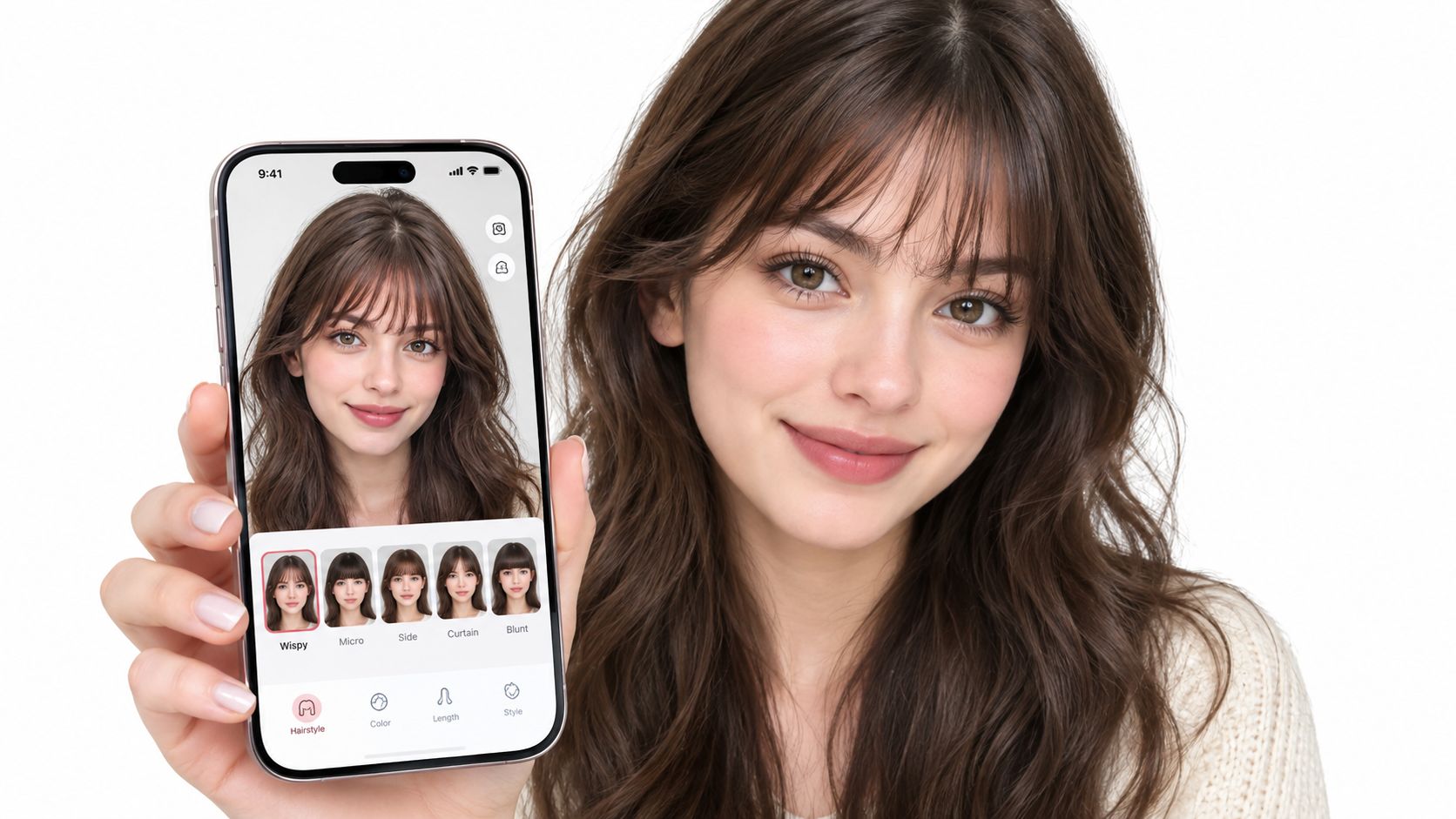
You can now test almost any fringe style at home in minutes, but a virtual preview is a guide to geometry and proportion, not a guarantee of what your hair will do after a salon cut. That distinction matters whether you're considering soft curtain bangs, a wispy fringe, or a bold blunt line.
You know the salon moment. You've shown your stylist a photo, they suggest bangs, and your hand immediately moves to your forehead. The idea sounds exciting until you remember that hair grows slowly, cowlicks have opinions, and a fringe that looks effortless on someone else may need daily styling on you.
A virtual try on bangs tool gives you a low-risk way to explore the visual decision first. It can help you compare length, density, parting, and shape on your own face before you book the appointment. The useful question, however, isn't “Do I look good with bangs?” It's “Could my actual hair create and maintain something close to this?”
Virtual try-on belongs to a wider move away from static beauty imagery toward personalized visualization. In September 2017, Redken partnered with Perfect Corp. to offer more than 75 professional hair-color shades through an augmented-reality try-on experience, using selfie or live-camera input, hair detection, segmentation, and shade rendering. Hair-color simulation isn't identical to bangs rendering, but the same foundations matter, including facial alignment, hair boundaries, occlusion, and realistic compositing. You can read more about the broader history in this documented Redken virtual hair-color milestone.
This makes a bangs preview valuable, but only if you treat it as a conversation starter. A good result helps you decide whether the proportions appeal to you. A good consultation then tests whether your density, texture, hairline, and styling habits can support the look.
Table of Contents
- Previewing Your New Bangs Without the Commitment
- Capturing the Perfect Selfie for Accurate Results
- Selecting and Customizing Your Ideal Bang Style
- Understanding the Limits of Virtual Hair Physics
- Exporting and Sharing Your Virtual Look
- Bringing It All Together for Your Next Appointment
Previewing Your New Bangs Without the Commitment
Start with one visual question at a time. If you try to judge face shape, color, volume, length, and texture in a single generated image, you'll struggle to identify what actually works. I usually recommend beginning with the silhouette, then adjusting the practical details.
A curtain fringe may open around the center and soften toward the cheekbones. A blunt fringe creates a stronger horizontal line. Wispy bangs leave more forehead visible and often feel less visually heavy. Micro-bangs change the balance of the whole face, so they deserve a more cautious comparison with several lengths rather than one dramatic preview.
Stylist's rule: Choose the shape you like first. Judge the maintenance burden second.
The technology has a useful precedent in beauty commerce. Virtual try-on lets people assess appearance before committing, which is particularly relevant when the “product” is a haircut that can't be returned. Industry reporting on a 2024 National Retail Federation study found that 25% of respondents had returned clothing bought online during the previous 12 months, compared with 17% for shoes, 12% for accessories, and approximately 9% for beauty ecommerce, as reported by Kase's overview of online beauty and apparel returns. Those figures don't prove that every virtual preview reduces returns, but they do show why shoppers seek more confidence before making appearance-related decisions.
Use the preview to create a shortlist:
- One low-commitment option: Try longer curtain or side-swept bangs.
- One texture-led option: Test a piecey or wispy fringe that leaves separation between strands.
- One bolder option: Compare a fuller blunt or shorter shape so you understand the visual boundary.
Save the versions that appeal to you, but don't send the most flattering image straight to your stylist as an instruction. Send it as a reference, then explain what you like about it, such as the opening at the center, the brow length, or the softness at the sides. For a wider look at personalized try-on experiences, explore this guide to AI virtual try-on for fashion ecommerce.
Capturing the Perfect Selfie for Accurate Results
The preview can only work with the evidence in the photo. A filtered, angled, low-resolution selfie may hide the hairline, distort facial proportions, or make the system guess where existing hair ends. That can produce a fringe that appears pasted on, develops a halo, or sits too high across the forehead.
Use a plain phone camera and prepare the hair before you shoot. Pull the front sections gently back, but don't flatten the hairline unnaturally. The system needs to see the relationship between your forehead, existing fringe, temples, and surrounding hair. If you always wear a side part or have a cowlick, take an additional photo showing that reality instead of disguising it.
Build a clean source image
Face a window for even light rather than standing beneath a strong ceiling fixture. Hard overhead light creates shadows at the brow and hairline, while backlighting can turn the front of the hair into a dark mass. A neutral expression helps landmark detection because exaggerated smiles or raised brows alter the visible shape around the eyes and forehead.
Keep the camera close to eye level and look directly into the lens. A near-frontal pose gives the system a cleaner basis for aligning facial landmarks. Side angles are useful later for discussion, but they're a poor starting point when you're trying to judge a fringe's width and placement.
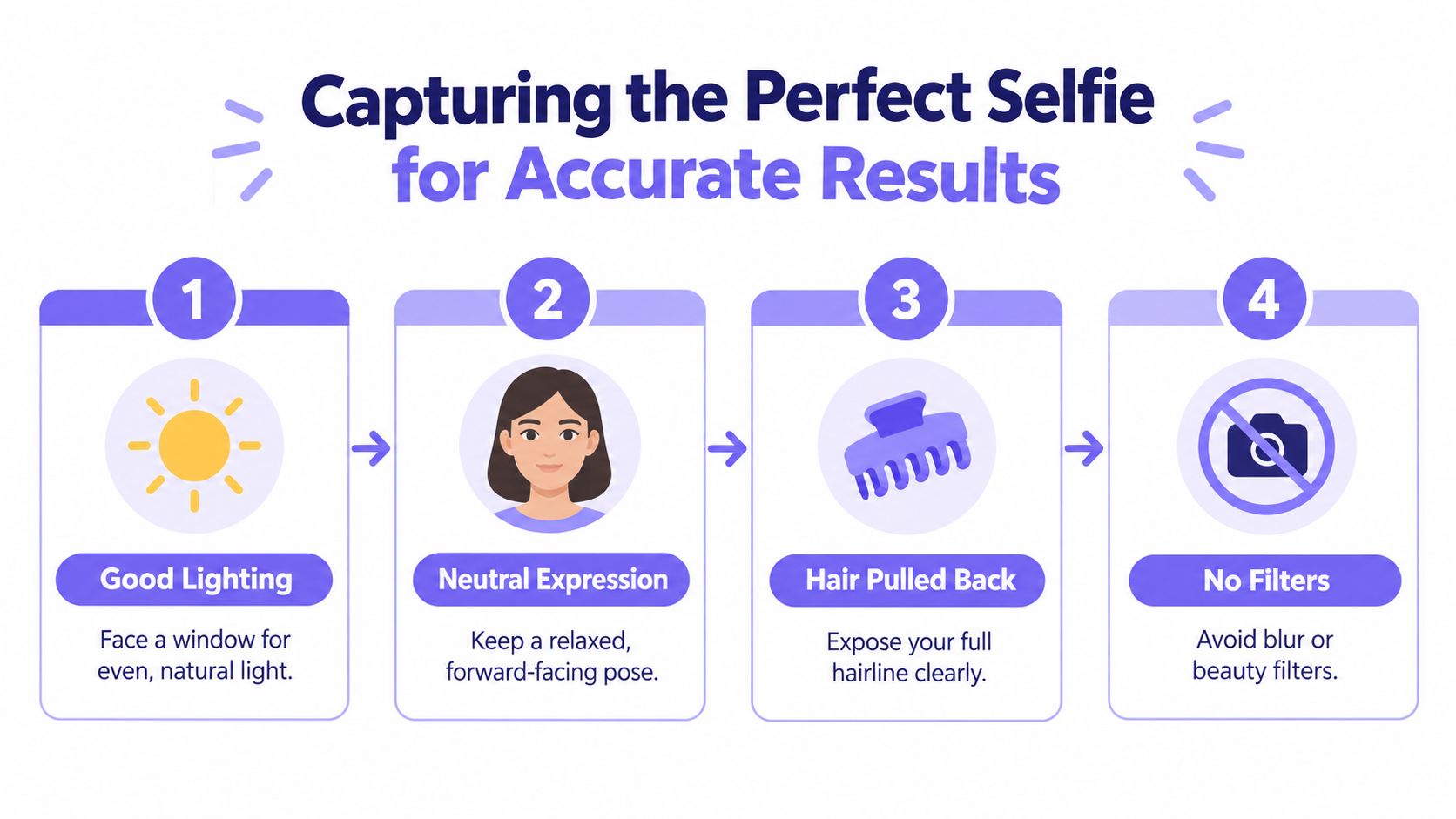
Before uploading, use this quick check:
- Lighting: Your forehead and hairline are visible without strong shadows.
- Pose: Your head faces forward without a pronounced tilt.
- Expression: Your face is relaxed, with your eyes open naturally.
- Hair: Existing bangs and loose strands don't obscure the region being changed.
- Image quality: The photo is sharp enough to show fine hair boundaries.
- Processing: Beauty filters, blur, and aggressive smoothing are turned off.
Hair segmentation is the operational gate here. A mobile-oriented U-Net implementation reported 13-millisecond inference and 89.9% accuracy, but that result describes segmentation performance, not guaranteed end-to-end bangs quality, as detailed in this hair-segmentation implementation report. Wispy strands, glasses, hats, complicated parts, and poor lighting still challenge the mask.
For platform-specific workflow details, consult the Vtry AI documentation. If the tool rejects your image or gives an unstable result, retake the photo rather than repeatedly regenerating from the same flawed source.
Selecting and Customizing Your Ideal Bang Style
Once the source image is clean, start with a recognizable reference style rather than an abstract prompt such as “make me look better.” Name the fringe and describe its behavior. “Long curtain bangs, center-parted, feathered toward the cheekbones” gives the system more useful direction than “trendy bangs.”
Style libraries are helpful because they give you a consistent starting point. Browse options by shape, then adjust one characteristic at a time. If you alter length, density, and parting together, you won't know which change improved the result.
Work from shape to density
Begin with the bottom edge. Ask whether the fringe sits above the brows, touches them, or falls toward the eyes. A small length change can shift the entire expression. Shorter bangs expose more forehead and create a stronger statement, while longer pieces can blend into face-framing layers.
Next, adjust density. “Light and separated” suggests a different visual result from “full and opaque.” Density should reflect your existing hair. Someone with fine hair may prefer a sparse, airy preview, while thick hair may need internal weight removed to avoid a heavy shelf across the forehead.
Parting controls movement and balance. Center-parted curtain bangs distribute attention toward the sides. A side-swept fringe creates directional movement. A blunt shape emphasizes the horizontal line, so compare it with a softened or piecey version before deciding that the whole category is wrong.
Use face shape as a guide, not a verdict
Face-shape labels can help you compare proportions, but they shouldn't become rigid beauty rules. Look at where the fringe ends relative to your brows, cheekbones, eyes, and jaw. If you want to reduce visual width at the forehead, a narrower opening or longer side pieces may be worth testing. If you want more openness, a lighter center can preserve the sense of height.
Generate a small set of controlled variations:
- Keep the same length and change only the part.
- Keep the same part and reduce the density.
- Keep the preferred density and compare a softer edge with a blunt edge.
- Test the style with your natural part, not only the symmetrical version.
Save the images with the prompt or settings if the interface provides them. That record helps you recreate the preferred version and gives your stylist a clearer explanation than a single unexplained screenshot.
Understanding the Limits of Virtual Hair Physics
A convincing image can still be a poor haircut forecast. Generative systems can create a clean fringe with even density, cooperative movement, and perfect separation from the forehead. Real hair has cowlicks, follicle direction, porosity, shrinkage, uneven growth, and habits built into it.
This is why a bangs feasibility check matters more than a flattering face-shape score. Existing evaluations describe AI hairstyle previews as useful for proportion and general shape, but less reliable for predicting texture, volume, movement, hairline behavior, and salon outcomes, as discussed in this independent analysis of AI hairstyle try-on.
Read the image for geometry first
Ask three separate questions:
| Question | What the preview can show | What it can't confirm |
|---|---|---|
| Does the shape suit my proportions? | Width, length, opening, and visual balance | How the cut will settle after washing |
| Can my hair approximate the density? | A general impression of fullness | Whether your roots can supply that volume |
| Will I wear it easily? | The style's apparent finish | Drying time, product, heat, and daily control |
Fine hair may not hold the fullness shown in a generated image. Curly or coily hair may spring upward or contract, changing the apparent length. Thick hair can need substantial internal texturizing, while a low-density hairline may not support an opaque fringe without exposing separation.
Cowlicks deserve special attention. A preview may place every strand in the intended direction, but your growth pattern may push the center apart, lift one side, or create a stubborn bend. Ask your stylist whether the desired shape can work with that movement, and whether the cut should be longer, lighter, or redirected.
Treat realism as a confidence range
A hairstyle-transfer benchmark used 450 challenging image pairs, with three independent participants judging each pair, and included transformations where existing hair had to be removed and previously covered forehead content inferred, as documented in the hairstyle-transfer benchmark. That kind of evaluation is useful because bangs often cross the exact boundary where hair, skin, and hidden information meet.
For your own decision, grade the image in separate categories:
- Boundary realism: Does the hairline transition look natural?
- Forehead reconstruction: Does the visible skin match the original lighting and shape?
- Identity preservation: Do your eyes, nose, cheeks, and face proportions remain stable?
- Pose consistency: Would the result still make sense if your head turned slightly?
- Wearability: Could your real texture and routine maintain the shape?
The last category is the one image generation handles least reliably. A beautiful result can be excellent for choosing proportion and still overpromise on daily behavior.
Exporting and Sharing Your Virtual Look
Export the image according to its purpose. A stylist needs a clear reference that shows the fringe and surrounding hair. Friends on social media may respond better to a vertical crop, but social feedback often rewards novelty rather than practicality, so don't treat a poll as a technical consultation.
Keep the original full-frame version before cropping. A close-up may make the bangs easy to inspect, while the wider image shows how the fringe connects to the haircut, temples, and overall length. If you create several variations, label them by style and key adjustment, such as “long curtain, light density” or “brow-length, soft edge.”
Match the file to the conversation
Send your stylist two or three options, not a large gallery. Include one image that shows your natural hair and explain what you want to preserve. For example, you might like the center opening from one version but want the lighter density from another. That gives the stylist an actionable brief without pretending the generated image is a cutting pattern.
For social sharing, remove unnecessary personal context from the image and consider whether you want the original face photo stored by the platform. Privacy questions include retention, deletion, model training, biometric inference, third-party processing, and whether generated images remain connected to the source face. The practical privacy guidance for AI hairstyle try-on highlights why these questions deserve direct answers rather than a general promise of safety.
Before uploading a face photo, check:
- Deletion controls: Can you remove the original and generated files?
- Training disclosure: Does the service explain whether images train models?
- Access: Are images shared with vendors or external processors?
- Consent: Do you have permission when uploading someone else's photo?
- Retention: Does the service state how long data is kept?
If your team or salon needs automated workflows, review the Vtry AI API documentation with the same attention to image handling and access controls you'd apply to any face-based service.
Bringing It All Together for Your Next Appointment
A useful virtual bangs preview should leave you with better questions, not false certainty. Capture a clean, forward-facing photo, compare controlled variations, and separate visual proportion from real-world feasibility. Then inspect the result for density, growth direction, texture, and the styling effort it implicitly assumes.
Bring the strongest reference to your stylist along with your natural-hair photo. Ask whether your cowlick, curl pattern, hairline, and density can support the shape, and request a modification if they can't. A stylist may preserve the center opening, soften the edge, extend the side pieces, or reduce the density while keeping the character you liked digitally.
Use this final checklist before booking:
- Visual preference: You know which length, opening, and edge you prefer.
- Hair reality: You've considered texture, density, cowlicks, and shrinkage.
- Routine: You understand whether the look needs blow-drying, product, or heat.
- Consultation: You're bringing a reference, not demanding an exact digital copy.
- Privacy: You know how the chosen tool handles your face image.
The best outcome combines digital confidence with professional judgment. The preview helps you articulate the look, while the stylist adapts it to hair that has its own physics.
Vtry AI brings people, garments, styling prompts, editing, shared workspaces, and exports into one AI fashion photo studio, with API access for teams that need repeatable image workflows. Explore Vtry AI to see how its virtual try-on and image-generation tools can support polished visual experimentation before you commit to a final look.
Made with Outrank tool