virtual try on api
Virtual Try on API: Endpoints, Auth and Patterns
Plan a virtual try on API integration: endpoints, bearer or API-key auth, generation polling, rate limits, and a review step before catalog use.

Software solutions accounted for 61.43% of the global virtual try-on market in 2024, according to Mordor Intelligence. That makes software integration a central part of the category, not an afterthought to a camera demo. For a retailer, the useful question is whether the API can connect people, garments, generated images, and business controls without creating an unreliable or unsafe workflow.
A virtual try-on API lets your backend request outfit images programmatically. Production readiness requires more than a convincing result: your team needs reusable resources, protected credentials, predictable queues, image-lifecycle controls, and a fair test of whether shoppers benefit. A realistic picture still doesn't prove physical fit, comfort, or a reduction in returns.
Table of Contents
- Virtual Try-On API Resources at a Glance
- Authenticate Requests With a Server-Side Key
- Consent, Retention and Face Data Controls
- Create a Person Then Queue the Outfit
- Catalog and Campaign Integration Patterns
- Rate Limits, Parallel Jobs and Safe Retries
- Measure Returns Impact Instead of Vendor Claims
- Ship a Small Reviewed Catalog Pilot
Virtual Try-On API Resources at a Glance
Think in terms of people, garment candidates, saved garments, and try-on jobs, with reads for retrieving those resources. Each category has a different purpose. Keeping them separate prevents a product-page import from becoming an accidental generation request.
Virtual try-on API resources
| Category | Call | Input | Result |
|---|---|---|---|
| People | Add a person | Up to 3 photos or a camera capture | Saved person reused across later jobs |
| Garment candidates | POST /api/v1/clothes/source-images |
A product source such as a page URL | Candidate image URLs |
| Garments | POST /api/v1/clothes |
One returned imageUrl |
A wardrobe item stored for reuse |
| Try-on jobs | POST /api/v1/generations |
One composed person plus one or more clothes or accessories, up to 7 | A queued generation to poll |
| Reads | GET on people, clothes, and generations | A resource identifier the account owns | Status, library data, or the finished image |
The distinction between a candidate image and a saved garment matters. A product page may contain a hero image, detail crops, alternate colors, and unrelated recommendations. Extracting candidates gives your importer options; saving the selected image establishes which product reference later jobs should use.
Person onboarding serves a different purpose. Add a recognizable tag, such as spring-catalog-model, so a merchandiser can select the intended identity without inspecting every source photo. Save the person once rather than rebuilding that identity whenever someone requests another outfit.
Why generation returns a job
Generation is asynchronous: the create request queues work instead of holding the connection open until an image is ready. Your backend stores the generation identifier, checks its status through a read request, and retrieves the image when processing succeeds.
This separation lets the storefront display a pending state without resubmitting the outfit. It also lets your operations team distinguish a request that was accepted from an image that passed review.
Practical rule: A successful queue response means the service accepted work. It doesn't mean the finished asset exists or is approved for publication.
The client doesn't send the production prompt. Our generation workflow composes identity preservation, clothing placement, pose, composition, lighting, and integration server-side. Prompt presets can expose their text for transparency, but that text isn't a substitute for the resource-based generation request.
What the resource map doesn't establish
The table isn't an authentication specification or a complete schema. Header requirements, quotas, error bodies, and validation rules belong in their respective integration contracts.
Nor does a generated image establish garment measurements, fabric weight, stretch, or comfort. Keep those attributes in the product catalog and present them alongside the visualization. For the shopper-facing distinction between visualization and physical evaluation, the virtual try-on overview provides useful context.
Store the identifiers your workflow will need later: person, garment, generation, and workspace. Treat them as scoped references, not as proof that whoever supplies an identifier is entitled to access it.
Authenticate Requests With a Server-Side Key
Use one credential style per request. Prefer the standard bearer header for a server client:
Authorization: Bearer YOUR_API_KEY
For a server-side integration that can't set a bearer token, use the supported alternative:
x-api-key: YOUR_API_KEY
These are alternatives, not headers to combine. Configure your application to fail closed when its credential is missing rather than sending unauthenticated requests repeatedly.
Create the key without exposing it
Create or rotate the key from the account profile page. The full key is shown only once, so copy it directly into a server-side secret manager or a protected environment variable.
The application should retrieve that secret at runtime. Don't place it in a repository, shared document, task description, or debugging transcript that people outside the authorized integration team can access.
- Browser code: Never embed the key in JavaScript shipped to shoppers.
- Mobile binaries: Don't treat a compiled application as secret storage.
- Storefront themes: Keep credentials out of theme settings and templates delivered to clients.
- Client-side agents: Don't paste the production key into a prompt running in a shopper-controlled environment.
A backend automation runtime can use a key without exposing it to the person who initiated the task. The important boundary is where the credential lives and who can retrieve it, not whether a human or an agent triggers the request.
Separate service authentication from shopper access
The API key authenticates your integration. It doesn't establish that a shopper owns a particular person image or generation.
Your commerce backend should authenticate the shopper, resolve the resources that shopper may use, and then call the API. Return only an authorized job identifier or finished image location to the storefront. Don't pass through the service credential or unrestricted library responses.
A key that can create people, import garments, and consume generation quota isn't a public widget token. Place a narrow application endpoint in front of those capabilities, with checks for the shopper session, permitted action, and applicable workspace.
Credential boundary: The browser requests an allowed action from your backend. Your backend decides whether to make the authenticated API call.
Before queuing any generation, perform a read-only smoke check: make an authenticated GET that lists resources in the intended workspace. Confirm that the response belongs to the correct account and that an invalid credential produces an authentication failure rather than partial data.
If the credential is rejected, stop and fix it. Repeated authentication failures belong in your alerting workflow, not an automatic retry loop. Permission to upload a face is a separate consent decision, even when the service key itself is valid.
Consent, Retention and Face Data Controls
Privacy affects whether shoppers keep using personalized try-on. A study involving 396 experienced Indonesian Gen Z virtual-try-on users found that body-privacy concern weakened intention to continue, while trust and perceived value strengthened continuation. Treat image governance as part of the customer experience, not just a legal appendix.
Give people visible controls before their photo becomes a reusable workspace resource.

Make the image lifecycle visible
An administrator should be able to inspect what was collected, why it's retained, who accessed it, and how to remove it. Design the integration around explicit lifecycle records:
- Collection: Capture purpose-specific consent before storing a shopper or model image.
- Reuse: Separate permission to generate an outfit from permission to train on or otherwise reuse the image.
- Retention: Choose the shortest retention period the workflow needs and document when deletion starts.
- Access: Encrypt person media, isolate tenants and workspaces, and log source-photo and export access.
- Withdrawal: Record consent withdrawal and prevent new jobs from using the affected person.
- Removal: Track deletion through source media, derived person assets, generated outputs, and downstream copies.
Don't collect extra reference photos just because onboarding accepts them. Each additional image should serve the stated purpose.
Distinguish required controls from confirmed API behavior
A deletion button that hides a storefront preview isn't enough. Your acceptance test should verify that the person, affected garment media, and generated results are no longer accessible through authorized reads, and that retained backups follow the documented deletion process.
A deletion endpoint and confirmation response aren't established here. Don't invent a DELETE route or assume that deleting a person cascades to every result. Before accepting personal-image traffic, document the supported deletion operation, its response, any asynchronous completion state, and how your team verifies removal.
Apply the same discipline to regional processing. State where person images are stored and processed, whether processing can be pinned to a region, and which subprocessors handle them. Review the data processing agreement, then resolve any operational details it doesn't establish before launch.
Review faces in garment imports
Our library flags garment images containing a visible face because that face can confuse try-on and produce inconsistent results. Use Extract (AI) to find a cleaner product image, then have the importer confirm the selection.
Also define a human escalation path for accidental uploads, deletion failures, and unauthorized access. Personalization can increase perceived value while increasing privacy risk; shoppers need understandable controls over both.
Create a Person Then Queue the Outfit
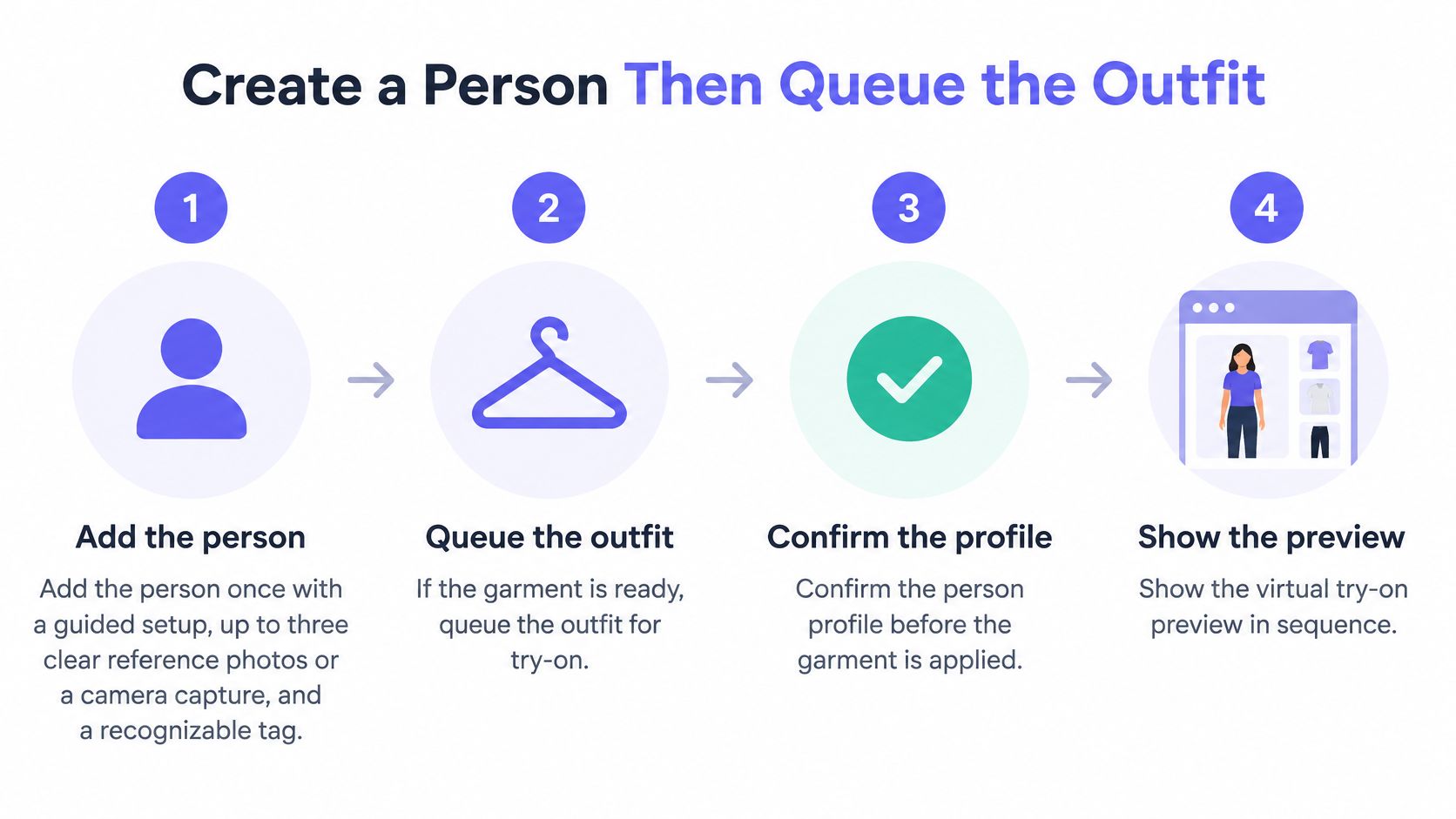
Build the integration as a sequence of saved resources, not as repeated uploads attached to a single generation call. The workflow below separates onboarding, image selection, garment storage, and job tracking.
The process illustration shows the person-to-preview sequence; backend implementations should preserve the validation checks around each transition.
Build and validate the resources
Add the person once. Use guided onboarding with clear reference photos or a camera capture, then assign a recognizable tag. Review the composed person before applying clothing. A useful failure test is an unusable or inconsistent reference set: the integration should ask for correction rather than creating the wrong reusable identity.
Extract garment candidates. When the source is a product page, call
POST /api/v1/clothes/source-images. Inspect the candidates for the correct product and color. Include a test with a visible face in the garment image so your importer demonstrates the review and extraction path.Save the chosen garment. Send one selected
imageUrltoPOST /api/v1/clothes. Store the returned garment identifier against the commerce SKU. Reject an attempt to stuff anotherimageUrlinto the same single-image operation rather than treating it as a valid wardrobe item.Queue the outfit. Call
POST /api/v1/generationswith the composed person and the selected saved clothing or accessory items. Validate the garment count before submitting. An outfit above the supported cap should produce a clear validation failure in your integration, not a pending card that can never complete.Poll and retain the result reference. Read the generation by its identifier until processing reaches a documented terminal state. Save the result identifier in the same workspace context. Test a client that mistakes the queued response for a finished file, and ensure it displays pending work instead of a broken image.
Make examples concrete without inventing a schema
The following is an illustrative application-level payload, not a claim about the API's exact wire-field names:
POST /api/v1/generations
{ "personId": "person_catalog_model", "garmentIds": ["garment_shirt", "garment_trousers", "garment_shoes"] }
An illustrative accepted response is:
{ "generationId": "generation_catalog_look", "status": "queued" }
Preserve the selected outfit order in your own request record, but don't assume array order defines layering unless the endpoint contract says so. Map these application fields to the documented request schema before running the call.
The accompanying walkthrough helps operators recognize the workflow they're automating.
Stop polling only on documented terminal states
Your polling loop should perform a GET on the generation identifier, inspect status, wait with backoff while work remains active, and stop on documented success or failure. On success, retrieve the image location; on failure, capture the error and offer an explicit retry action.
The complete status enumeration and exact GET route aren't established here. Don't guess values such as done, completed, or failed in production code. Copy every supported value from the endpoint reference and classify each as pending or terminal in your adapter.
Treat an unknown status as a contract mismatch: stop uncontrolled polling, retain the job identifier, and alert the integration owner. At minimum, your application response should expose job ID, status, and the image location when complete.
Preset names and their returned text can support operator transparency. They don't move production-prompt composition into the client.
Catalog and Campaign Integration Patterns
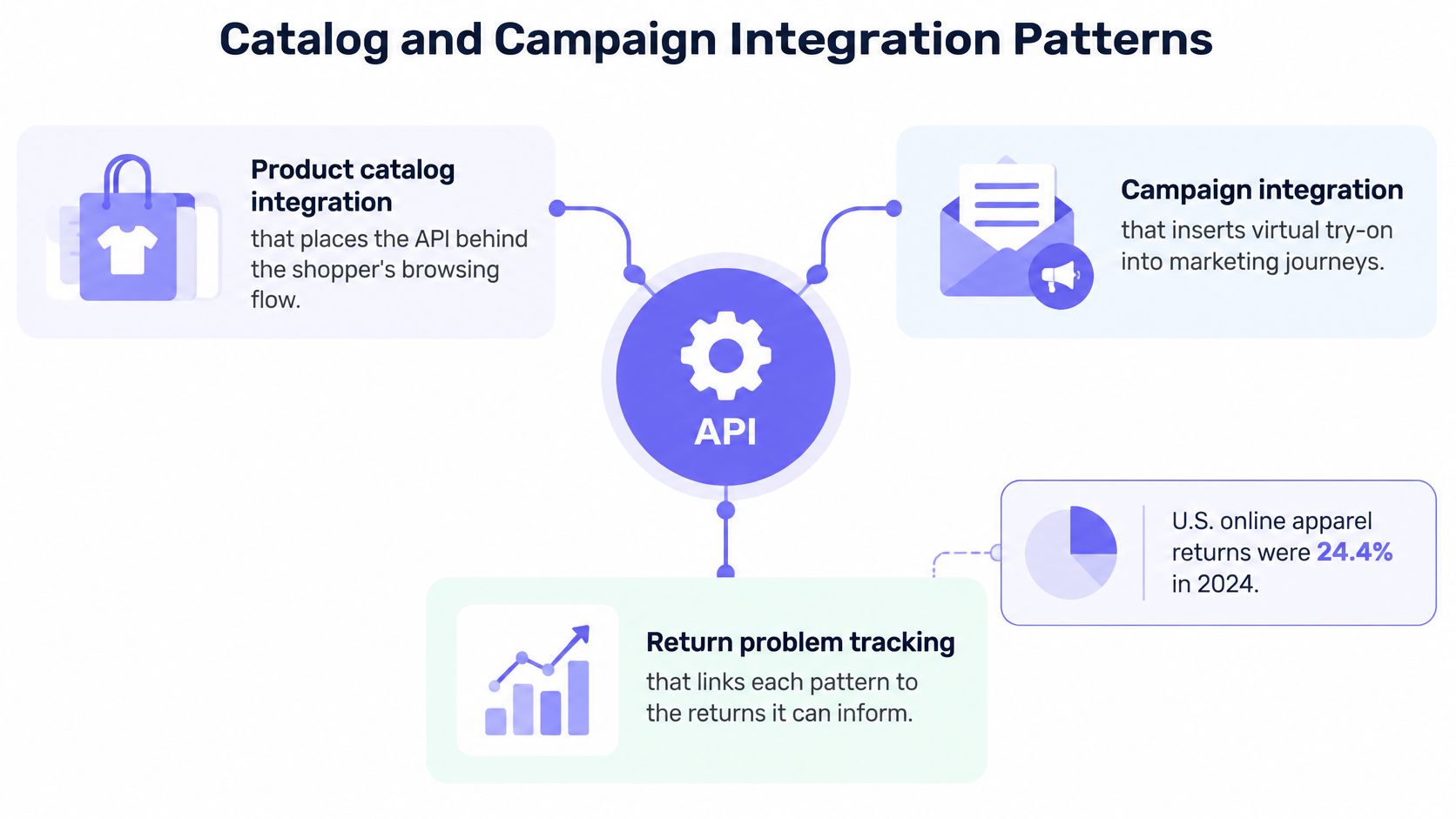
Coresight Research's findings, summarized by Solo Media Group's apparel returns analysis, put the U.S. online apparel return rate at 24.4% in 2023, equivalent to approximately $38 billion in clothing shipped back that year. Those figures establish a commercial problem, not a guaranteed improvement from adding virtual try-on.
Place the API behind systems shoppers and staff already use. Assign an owner to each integration so someone is accountable for resource mapping, output review, and downstream results.
The diagram illustrates the connections between catalogs, campaigns, and return tracking. For the dated return baseline, use the cited year in the paragraph above.
Product detail owned by the commerce team
A shopper selects a product and requests a preview. The commerce backend resolves the SKU to a saved garment, selects an authorized house model or opted-in person, and creates the job.
Render the reviewed result beside the size chart and garment measurements. Don't label an attractive image as confirmation that the selected size will fit.
Keep a record of the SKU, garment reference, person reference, and generation used for that preview. If a product image changes or a supplier replaces a colorway, invalidate the mapping deliberately instead of continuing to generate from an obsolete source.
For a multi-item look, make the purchasable components clear. A shopper shouldn't have to guess whether the shoes or jacket shown in the image belong to the selected product.
Catalog and campaigns owned by merchandising
Merchandising can reuse an approved person across a collection while changing garments and composition. The review task becomes checking product fidelity across the set, rather than merely accepting every attractive image.
Inspect logos, closures, hem lengths, prints, and accessory placement against the source photos. Publish approved stills into the asset-management workflow with their associated product references and usage permissions.
The product photography automation guide gives context for connecting this work to repeatable catalog production. Keep generated originals and channel-specific crops distinguishable so an ad crop doesn't accidentally replace the catalog master.
Internal tools owned by operations
An operations script or server-side agent can prepare assets inside a workspace. Give it a defined task, such as generating review candidates for approved products, rather than an unrestricted instruction to create and publish content.
- Input gate: Accept only approved product records and authorized person references.
- Review gate: Require a named human reviewer before publication.
- Publishing gate: Send only approved asset identifiers to the destination channel.
- Audit gate: Retain the request, source references, reviewer, and destination.
A voluntary preview click and a catalog-wide imagery change are different interventions. Log which experience each shopper encountered so analysts can evaluate them separately.
Keep person, garment, and result identifiers in the commerce system. The next collection should extend the existing library, not rebuild it through another round of untracked imports.
Rate Limits, Parallel Jobs and Safe Retries
Virtual try-on API rate limits
| Limit class | Threshold | Client behavior |
|---|---|---|
| Read GET endpoints | 60 requests per minute | Poll and list on a backoff |
| Write endpoints | 30 requests per minute | Schedule garment saves instead of tight loops |
| Generation endpoints | 10 requests per minute | Queue outfits and don't retry a queued job as a new POST |
POST /api/v1/clothes/source-images |
5 requests per minute | Extract once per product URL, then reuse imageUrl |
| Active parallel generations | 3 POST /api/v1/generations per account |
Cap workers at 3 |
| Pre-key traffic | 120 requests per minute per IP | Keep calls server-side and coordinate shared egress |
| Failed authentication | 30 requests per minute per IP | Stop resending a rejected key and fix the credential |
Design the client around these ceilings, not around a successful demo loop. Concurrency and request rate are separate controls: a worker pool can stay within its parallel-job limit while still submitting too many requests over time.
Budget the entire workflow
Use a shared scheduler for generation, imports, writes, and reads. A catalog importer and a shopper preview service shouldn't independently assume they own the account's full allowance.
Back off polling and add jitter so jobs don't all trigger reads at the same instant. Paginate library reads, cache stable mappings, and avoid fetching a complete wardrobe merely to check a job.
Configure client-side limits for garment count, source-image size, and requested output resolution using the endpoint's documented constraints. Don't invent a payload maximum when the contract doesn't state one.
Quotas don't replace authorization
The OWASP API Security Project identifies Broken Object Level Authorization and Unrestricted Resource Consumption as API risks. Apply authorization checks whenever a request accesses data using a supplied identifier, and constrain expensive operations rather than relying on authentication alone.
For every person, garment, generation, and export:
- Verify membership: Confirm the caller belongs to the intended workspace.
- Verify ownership: Resolve the resource within that authorized scope.
- Verify operation: Separate permission to read, generate, edit, or export where supported.
- Limit exposure: Return only the fields the requesting application needs.
An identifier copied from another workspace must never become a shortcut around these checks.
Retry uncertainty without duplicating work
Use an idempotency key for generation if the endpoint documents support for it. Don't assume an arbitrary header will prevent duplicate jobs.
Without confirmed server-side idempotency, keep a durable application request record and reconcile uncertain submissions before creating another job. A network timeout doesn't tell you whether the server accepted the first request.
An accepted asynchronous request is work to track, not an error to repeat.
If an agent treats an HTTP 202 Accepted response as a server failure and keeps posting, it can exhaust the generation budget through duplicate submissions. Retry policies should distinguish authentication failures, validation errors, throttling, uncertain transport failures, and accepted jobs. Only the appropriate categories should enter a bounded retry path.
Measure Returns Impact Instead of Vendor Claims
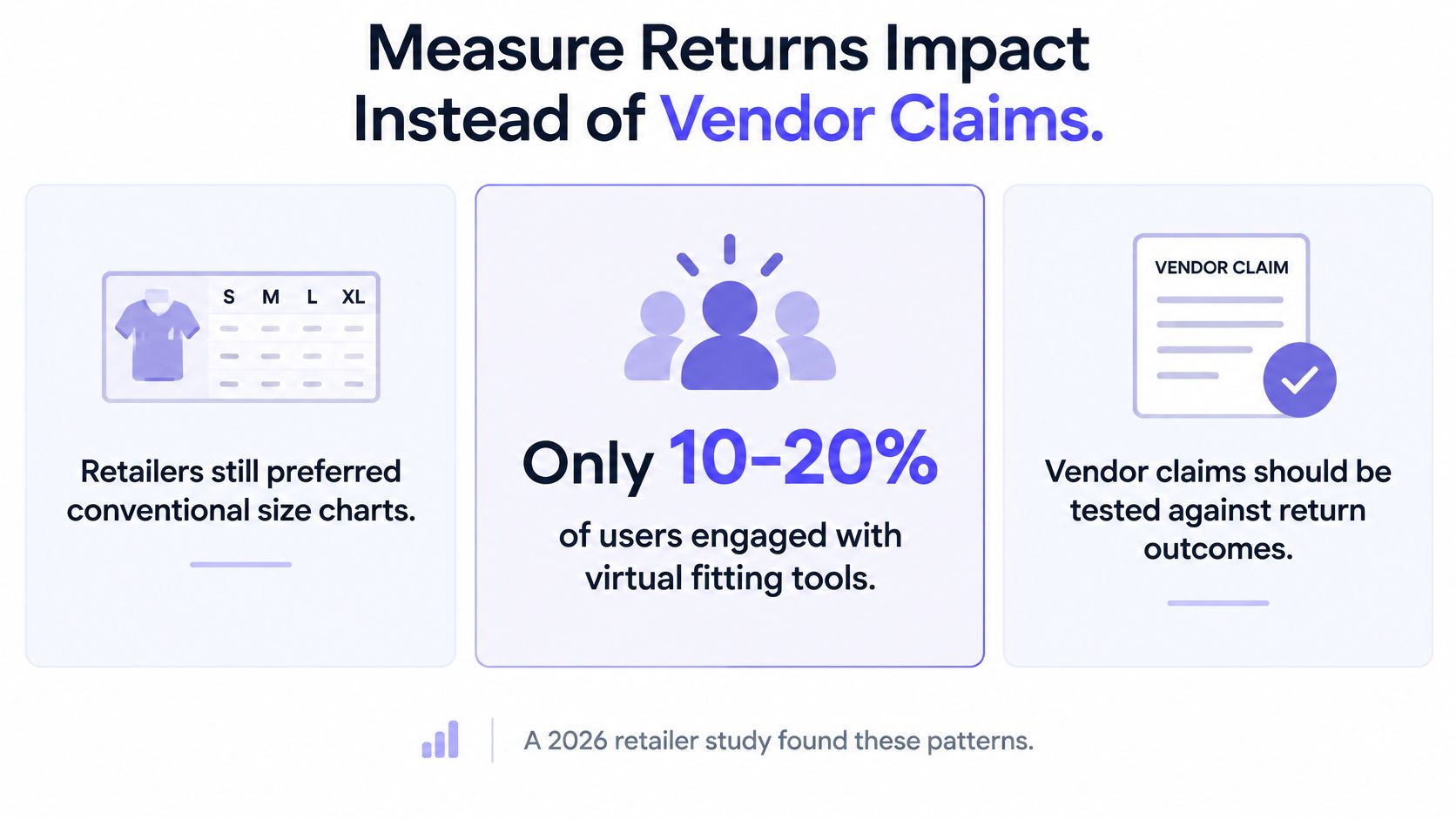
A 2026 retailer study found that only 10–20% of users engaged with virtual fitting tools, while retailers still preferred conventional size charts; the same study reported provider claims of an average 36.5% return reduction and 17.94% conversion increase. These are different measures with different evidentiary weight, not a forecast for your implementation.
The buyer's shortcut is to judge an API by image quality and then assume business results will follow. The stronger test asks whether offering the feature changes outcomes among comparable shoppers, including those who never activate it.
The distinction between engagement and claimed improvement should remain visible in the rollout review.
Define the comparison before launch
Randomly assign eligible shoppers to an experience that offers the module and a comparable experience that doesn't. Keep the assignment stable enough to avoid a shopper moving between treatments during the purchase journey.
Compare those assigned groups. Don't compare people who voluntarily completed try-on with everyone else: enthusiastic users may already differ in purchase intent, category interest, or willingness to upload a photo.
Preselect the primary outcome, eligibility rules, analysis window, and minimum sample. Have the analyst calculate the required sample from baseline behavior and the smallest effect that would justify deployment, then report uncertainty with a confidence interval.
Measurement discipline: Evaluate the decision to offer the feature, not just the behavior of shoppers who chose to use it.
Instrument the full path
Your event model should connect the experience to commercial outcomes without copying raw body images into analytics.
- Exposure: Was the module rendered and visible?
- Activation: Did the shopper open it and begin the workflow?
- Completion: Did the shopper receive a usable try-on result?
- Commerce: Did they add to cart and purchase?
- Post-purchase: Did they keep, exchange, or return the item for a refund?
- Reason and reuse: Why was it returned, and did the shopper use try-on again?
Segment results by category, market, device, and whose body is represented, subject to consent and appropriate privacy controls. A house-model preview and a personal-photo workflow may create different adoption barriers.
Don't condition the primary business comparison on successful generation. Timeouts, abandoned consent screens, and unusable outputs are part of the offered experience.
Review failures the image benchmark misses
Ask shoppers who don't proceed whether they couldn't find the control, distrusted the picture, or didn't want to provide a photo. Record when product measurements remain unavailable, even if the rendered outfit looks convincing.
A more realistic image can leave returns unchanged when shoppers don't engage or still lack the information needed to choose a size. It can also affect exchanges differently from refunds, which is why a single blended return measure may hide useful operational changes.
Expand only when the assigned exposed-shopper comparison improves the return or conversion metric chosen in advance, without unacceptable privacy, fidelity, or reliability failures.
Ship a Small Reviewed Catalog Pilot
Choose a single collection, a saved person, and a small set of multi-garment looks. Keep every output behind human review before it appears on a product page or in an advertisement.
The first technical action is straightforward: create the server-side key, run an authenticated outfit generation, and compare the output with the source material. Check identity, garment color, print placement, closures, proportions, and whether accessories have been omitted or invented.
Require evidence at the launch gate
Before real shopper traffic reaches the workflow, confirm the conditions that make the pilot defensible:
- Consent and deletion: The person has an appropriate consent record and a tested removal process.
- Rights clearance: Your team has rights to the uploaded people, garments, brands, and source images.
- Evaluation design: A holdout or assigned exposed-shopper comparison exists, with a primary metric agreed in advance.
- Review ownership: A named person can approve, reject, and withdraw an image from downstream channels.
Generated visuals can support product pages, campaign tests, ads, and social posts when those rights exist. Approval for a catalog use shouldn't automatically become approval for every campaign or partner channel.
Connect the catalog after the outfit passes review
Only then attach the workflow to the commerce system. Preserve the validated request sequence, resource mappings, asynchronous tracking, and bounded worker behavior rather than replacing them with a fast publishing loop.
For a backend, automation script, or internal agent, our public API supports person creation, garment uploads, queued try-on jobs, and retrieval of the final image result. The API documentation contains authentication guidance, endpoint references, and request examples for implementing those calls.
Keep the pilot decision narrow: can your team generate a faithful outfit, govern its source images, and measure the resulting experience responsibly? Start with an authenticated outfit generation and a human review before connecting anything else.
Vtry AI offers reusable people and garment libraries, multi-garment virtual try-on, and an API for backend and automation workflows. Visit Vtry AI to prepare a small catalog pilot, then generate and review an outfit before connecting it to your storefront.