AI fashion photography
AI Fashion Photography: How It Works and How to Use It
Learn how AI fashion photography generates, edits, and virtualizes models, plus workflows and brand-consistency best practices for ecommerce teams.
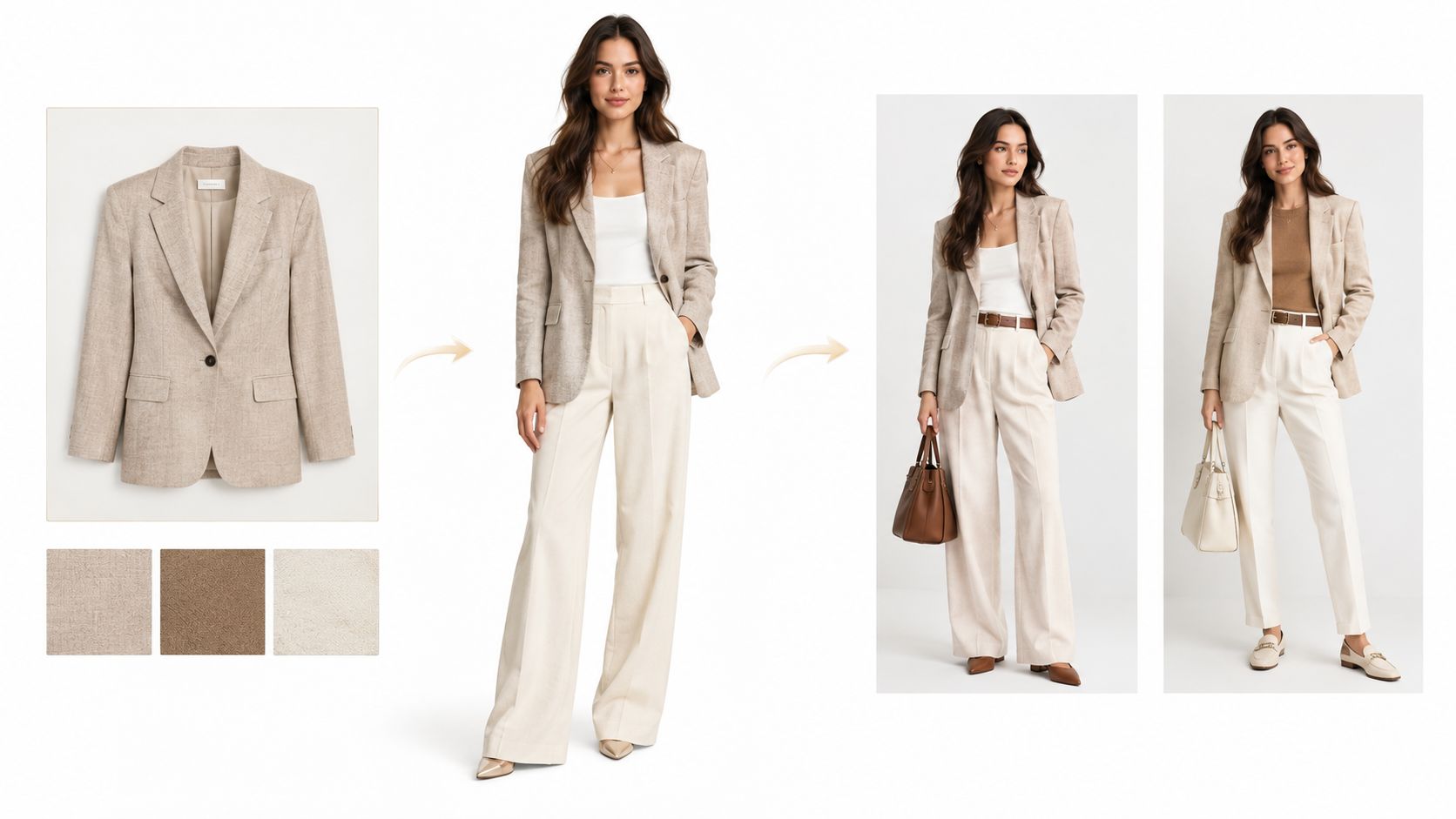
Your collection launch is approaching, and the shot list keeps growing. You need clean product views, complete outfits, campaign crops, and images that still look like your brand when they appear together. Booking another shoot feels expensive, but publishing synthetic images that misrepresent the clothes could cost you shoppers' trust.
AI fashion photography belongs in that planning conversation. The useful question isn't whether a generated image looks impressive. It's whether your team can produce an accurate, consistent, clearly explained set of images and show how each approved asset was made.
Table of Contents
- Why Brands Are Turning to AI Fashion Photography
- From Studio Shoots to Generated Images
- How Generation, Editing, and Virtual Models Fit Together
- Judging Quality Beyond Visual Realism
- Building a Brand-Consistent Workflow from Brief to Export
- How to Choose the Right AI Fashion Photography Approach
- Start Your First Reviewed AI Fashion Photo Set
Why Brands Are Turning to AI Fashion Photography
A collection launch forces practical choices. Which garments need a physical shoot? Which styling ideas should the team test before booking models? Which existing photographs only need a different crop or background?
AI fashion photography means generating or editing on-person garment images using visual references and instructions. It doesn't have to mean abandoning physical photography. Think of it as another production method, with its own inputs, review requirements, and limits.
In McKinsey and The Business of Fashion's fashion-executive survey for 2025, 50% of executives identified product discovery as the most important generative-AI application, while 45% said AI-enabled marketing could create substantial value. Those priorities help explain why generated imagery now belongs in merchandising discussions, not just creative experiments.
The business question behind the image
Product discovery depends partly on helping shoppers understand what an item is and how they might wear it. A generated outfit can offer styling context. It shouldn't become unsupported evidence of how a real garment fits or moves.
Different teams can approach the same technology for different reasons:
- Brand teams can explore campaign direction before committing to production.
- Marketplace sellers and DTC merchants can assess whether on-person styling adds useful context beside product photographs.
- Creative teams can test backgrounds, compositions, and outfit combinations.
- Developers and operations teams can connect approved image workflows to catalog systems through an API.
The shared challenge is consistency. A convincing standalone image isn't enough if the next image changes the model's face, the garment's neckline, or the brand's lighting style.
Decide what the image must prove
Before choosing software, separate the decisions your team needs to make: what to generate, what to verify, and what to disclose.
A campaign concept may tolerate imaginative scenery. A product-detail image needs stricter product accuracy. A synthetic lifestyle image needs enough explanation that shoppers understand what they're looking at. Start with that intended use, rather than a promise of unlimited content.
From Studio Shoots to Generated Images
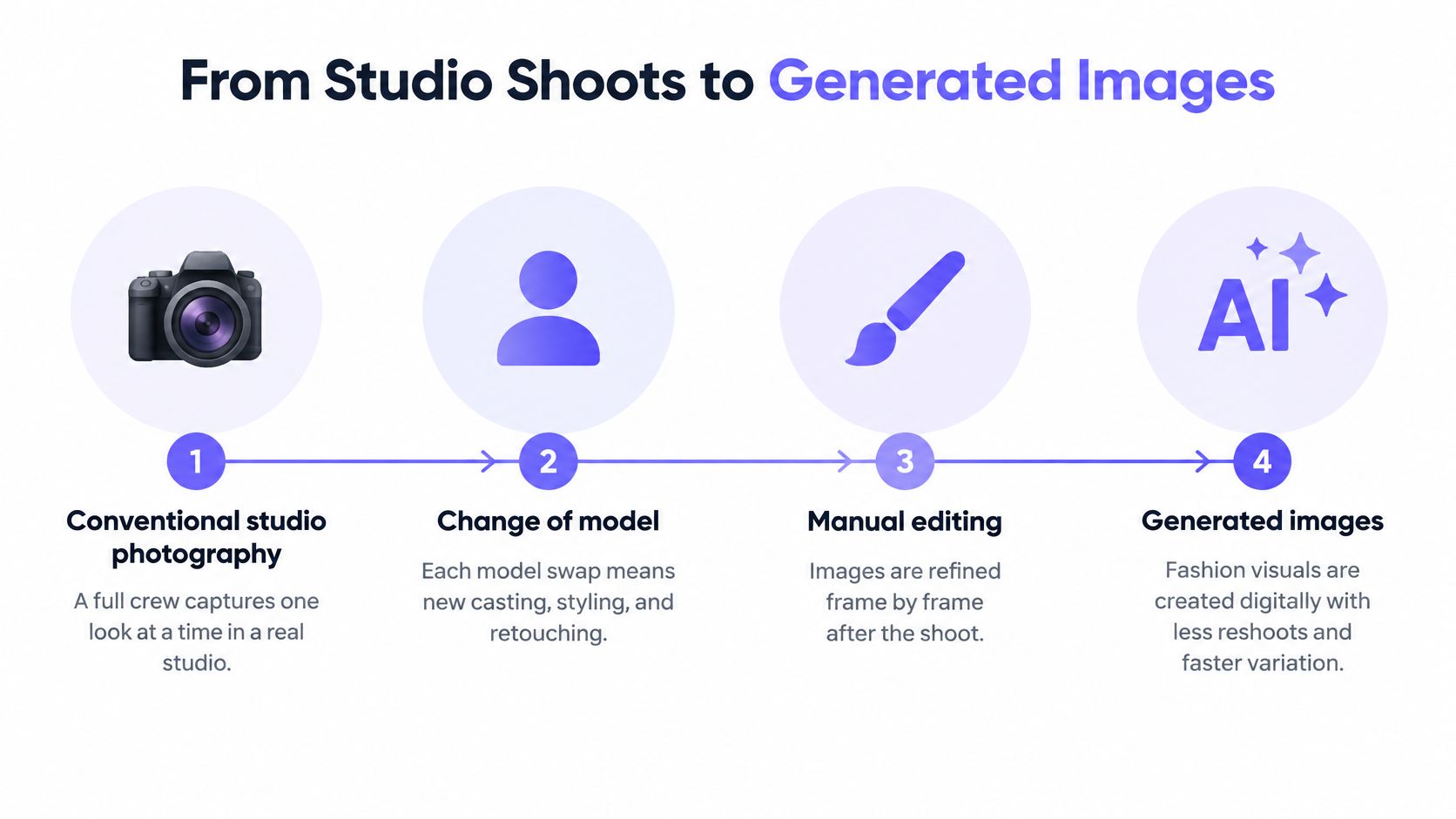
Conventional fashion photography starts with a physical arrangement. Someone casts the model, prepares the garment, builds the set, shapes the light, and captures the frame. Changing that arrangement usually creates more work for the crew or retoucher.
AI-assisted production lets a team test proposed arrangements before building them. The difference is shoot-first versus test-first, not a matter of camera versus computer.
The production shift is illustrated below.
What changes before the shoot
Suppose a stylist is considering a knit top against a pale studio backdrop or in an outdoor café scene. With a physical shoot, the team must organize those settings or construct them afterward. With generation, the art director can assess rough visual directions first.
That preview is a planning aid. It's not proof that the proposed lighting, fabric behavior, or pose can be reproduced physically. A photographer still needs to assess what's achievable when a concept moves onto a real set.
McKinsey's discussion of fashion trends that matter in 2025 estimated that approximately 25% of generative AI's potential fashion value could come from creative applications and noted that about 70% of fashion transactions and purchases are digitally influenced. Creative applications included design alternatives, campaign concepts, and digital content.
What stays important
Large assortments make this planning approach especially relevant. A marketplace may need regional settings, seasonal updates, and differently shaped crops without reinventing its visual identity for every delivery.
However, digital variation still needs art direction. Teams must decide:
- What remains fixed, such as background tone, model treatment, and garment visibility.
- What may vary, such as setting or approved styling.
- What requires physical evidence, such as a close-up showing the actual fabric.
The same McKinsey discussion described an industry at the beginning of this transition, not one that had completed a replacement of photography.
Treat generated concepts like a fitting-room mirror for an idea, not a certificate of product accuracy.
For teams learning the fundamentals, this guide to fashion photography for beginners provides a useful grounding. Composition, lighting, and wardrobe preparation still matter when you describe a scene instead of building it.
How Generation, Editing, and Virtual Models Fit Together
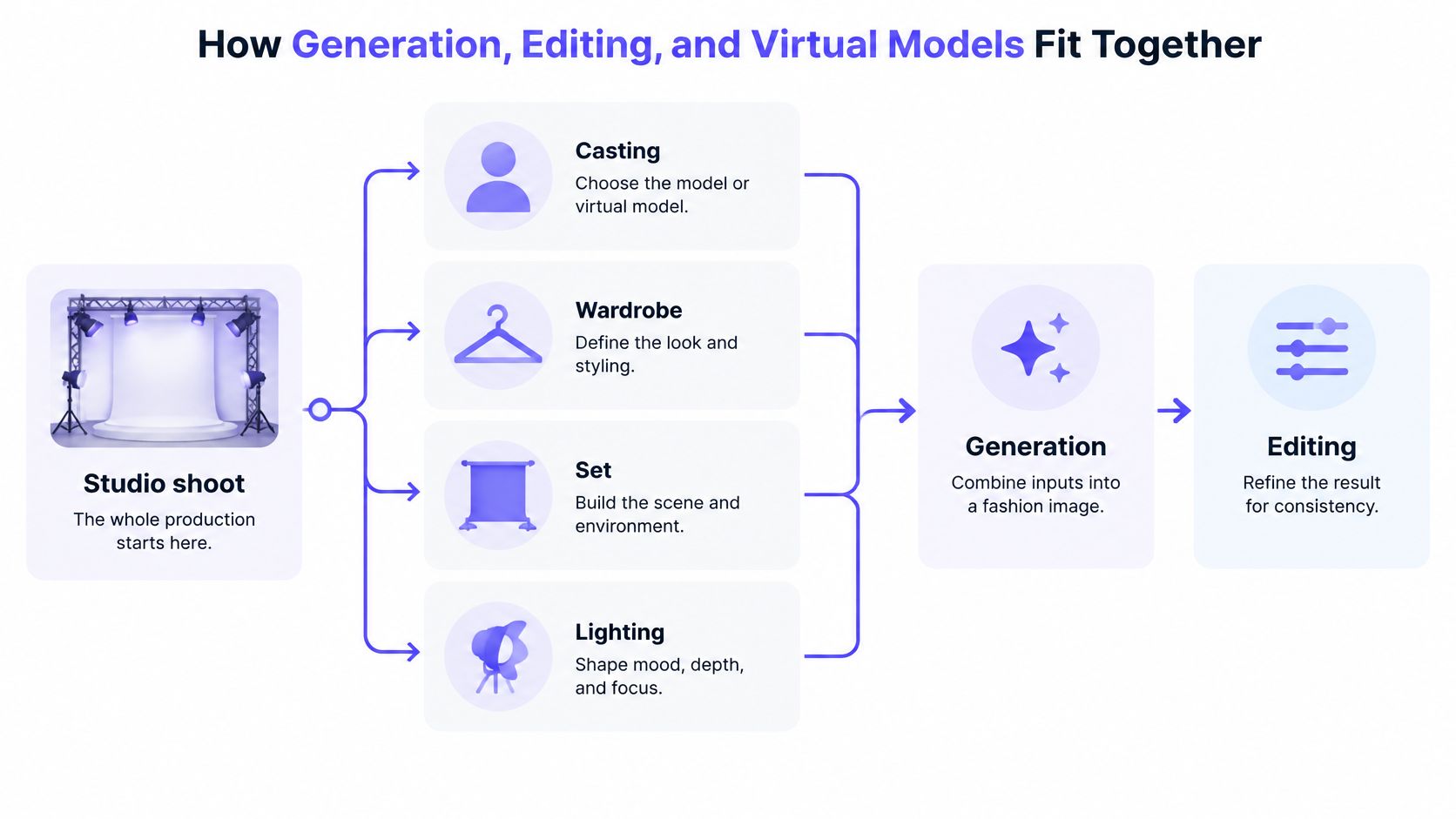
Think of a studio shoot as a stage production. Casting supplies the person. Wardrobe supplies the outfit. The set and lighting establish the environment. In AI fashion photography, you prepare references and instructions for those roles, then assess how the system combines them.
This diagram separates those production inputs from the actions used to create and refine an image.
Generation creates the arrangement
Generation creates a new on-person image from person references, garment references, and a description of the intended scene. The instructions might specify a front-facing pose, relaxed arms, soft studio light, and an unobstructed neckline.
A combined studio workspace can keep people, garments, prompts, and resulting images together. Multi-garment styling lets a team work on a complete outfit rather than treating every item as a separate overlay. Camera-angle controls can help define the intended perspective before rendering, although the result still needs inspection.
Editing changes an existing result
Editing starts with an image you already have. Text instructions can request a targeted change, while quick controls handle brightness, contrast, color, rotation, or flipping.
For example, a team might ask to simplify the background while preserving the knit top. That instruction describes the intention, not a guarantee. Review the whole image afterward, because an apparently local edit may also change a sleeve edge or face.
Virtual models provide reusable person references
A virtual model is a saved person reference used across looks. It reduces the need to describe someone's appearance from scratch, but it doesn't guarantee identical identity in every output. A more detailed explanation of an AI fashion model can help teams distinguish reusable references from verified likeness preservation.
Consider a hypothetical knit-top assignment:
- Studio version: Use the saved person reference with a plain backdrop and a pose that exposes the cuffs.
- Lifestyle version: Keep the same references while changing the setting to a café terrace.
- Review: Compare both outputs with the original top and the approved person reference before selecting either.
The following demonstration offers a visual introduction to working with these kinds of inputs.
The distinction matters: generation arranges the scene, editing refines an existing image, and a virtual model supplies a reusable casting reference. None replaces product verification.
Judging Quality Beyond Visual Realism
A catalog team approves a generated image because the model looks natural and the light feels expensive. Two weeks later, customer support gets a complaint: the actual cardigan has four buttons, while the image showed five, and the cuff ribbing was smoother than the shipped knit.
The image looked like photography. It still failed as product evidence.
Realism and accuracy are different questions. Treat review like a pre-press check in a studio: one person judges whether the picture is believable, another checks whether the garment, person, and setting match approved references.
Inspect the product and person separately
Turn the review into a sheet with separate failure categories:
- Identity fidelity: Compare the face, hairstyle, body proportions, and other distinguishing features with the approved reference.
- Texture fidelity: Inspect the knit, print, embroidery, logos, seams, and fastenings against the actual product.
- Shape plausibility: Check neckline geometry, sleeve length, garment boundaries, and how layers overlap.
- Background consistency: Look for unintended changes in areas that an edit was supposed to leave alone.
- Overall realism: Examine hands, shadows, contact points, and the relationship between the person and the scene.
Keep the scores independent. A strong scene cannot excuse a changed logo, and a faithful garment cannot excuse a model whose identity drifted from the approved reference.
Review at delivery size
A small preview can conceal damaged patterns or invented buttons. Inspect the image at the size and crop shoppers will encounter, including enlarged product views when available.
If your team upscales an image, review it again afterward. More pixels do not prove that the added detail matches the garment.
Approval rule: If a reviewer cannot verify a purchase-relevant detail against the product reference, do not present the generated detail as evidence.
Build a practical test set that includes different garment categories, poses, overlapping layers, pattern densities, and intended output sizes. Record identity drift and invented texture as distinct failures. That makes it easier to see whether a particular method struggles with striped shirts, layered jackets, or another recurring task.
Use different approval statuses for different destinations. A useful moodboard draft may still be unsuitable for a product page. Ideation approval and publication approval need separate owners, and the reviewer responsible for final merchandise accuracy should be named.
Keep a short production record with each approved candidate: references used, requested edits, review notes, disclosure choice, destination crop, and approver. If a shopper, marketplace, or internal stakeholder later asks whether an image was generated or altered, the team can answer from the record rather than memory.
Building a Brand-Consistent Workflow from Brief to Export
A catalog should look as though the same art director approved every image. Achieving that requires shared references and repeatable decisions, not a collection of unrelated prompts.
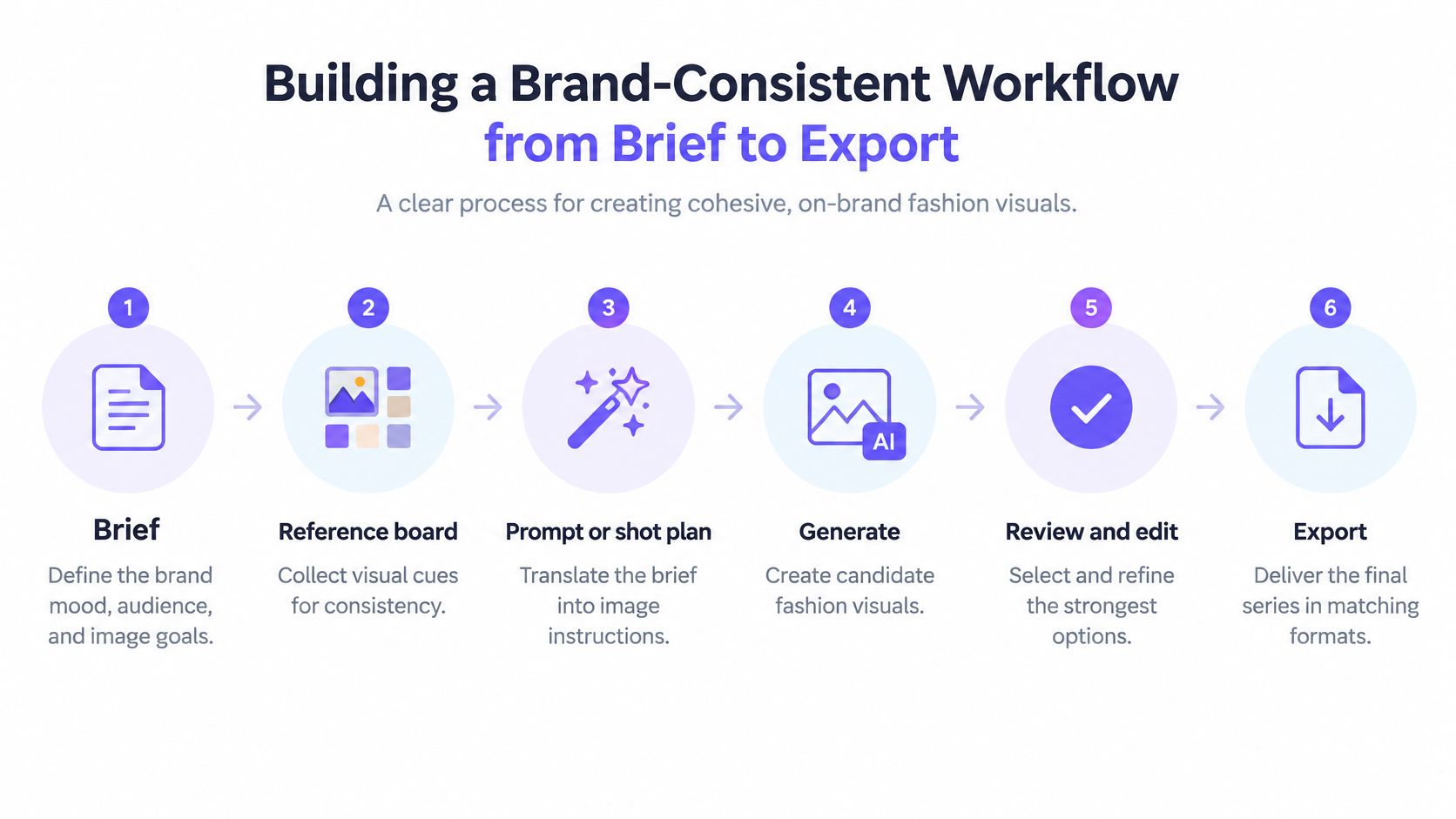
The workflow below provides a structure for that handoff.
Establish the brief and controlled inputs
Write down the destination, crop, product visibility, background, light, and pose before generating anything. “Clean ecommerce” is too open to interpretation. “Neutral backdrop, soft shadow, visible hem, no hand covering the fastening” gives a reviewer something concrete to approve.
Organize person and garment references separately. Use a reusable prompt template with fixed brand instructions and clearly marked fields for the product, pose, or setting.
- Generate controlled drafts: Change a variable deliberately so the team can identify why a result improved.
- Request specific edits: Describe the defect and the intended correction, rather than asking to make an image better.
- Review the series: Compare approved candidates together for crop, scale, light, and model treatment.
- Export by destination: Check each final crop independently, since a suitable catalog image may become misleading when cropped for an advertisement.
For storefront-specific planning, the guide to Shopify product photography provides additional context for organizing product imagery.
Make disclosure part of approval
A survey reported in Scalio's discussion of fashion brands using AI photography found that 59% wanted disclosure when AI imagery was used, while 71% couldn't distinguish an AI-generated product image from a conventional photograph. Those findings support treating disclosure as a deliberate design decision, not a hidden production note.
Describe what was synthesized. A label identifying an AI-generated person and environment communicates something different from a notice that the garment itself was digitally altered. Don't use language suggesting the clothing was photographed separately unless that happened.
Publish product-only reference photographs alongside synthetic lifestyle imagery. Place the explanation where shoppers encounter the image, then assess comprehension, brand credibility, returns, and add-to-cart behavior without assuming disclosure will improve or reduce any particular metric.
Finally, keep a production record containing the source assets, prompt version, edits, reviewer, intended use, disclosure wording, and approved export. That record gives the next teammate a starting point and helps trace problems back to their source.
How to Choose the Right AI Fashion Photography Approach
A catalog team planning a spring drop faces a practical question: which images must document a real garment on a real person, and which can be synthesized without weakening shopper trust? The answer shapes every downstream decision. Evaluate each method against speed, person resemblance, output resolution, catalog accuracy, campaign freedom, collaboration, and the need for API automation.
Traditional photography remains the reference point when the image must record an actual person wearing an actual garment. It still demands careful styling and honest retouching, yet the starting frame captures a physical arrangement that shoppers can cross-check against what arrives in the box.
Reference-based generation suits exploring new on-person arrangements or synthetic environments. Editing existing photographs fits better when the starting frame already works and the requested change is limited.
Compare the available production options
Vtry AI is one reference-based option that combines garment imports, saved people, generation, editing, and exports in a shared workspace. Its Smart Wardrobe supports product-URL imports and in-app search, while teams can share libraries and pooled credits. API access supports automation for larger catalogs.
The platform also provides multi-garment styling, an interactive camera, and upscaling or native high-resolution output on supported plans. Check current plan availability before designing a delivery specification around a particular export mode.
Model options at a glance
| Model | Stated Strength | Best Fit |
|---|---|---|
| Nano Banana 2 | Faster iteration | Exploring styling, composition, and draft concepts |
| GPT Image 2.5 | Higher resemblance | Candidates for final catalog or campaign review |
These are stated product strengths, not independently established guarantees. Test each option on your own garments and person references. A model name alone cannot tell you whether a fine print or a difficult layered outfit will survive generation accurately.
Ask what the evaluation actually measures
Technical scores work like a fabric lab test: they measure specific properties under controlled conditions, yet they cannot tell you how the garment reads on a crowded product page. Paired-image evaluation matters because reviewers compare a generated result against a known garment reference. Virtual try-on research presented at ICPR reflects this approach, using paired person-and-garment imagery so evaluators can check whether a synthesized outfit preserves what the shopper will receive.
For a technical review, distinguish the questions behind the measurements:
- SSIM and LPIPS address structural and perceptual similarity.
- CLIP similarity assesses semantic alignment.
- FID evaluates distribution-level realism and does not certify an individual product image.
Human reviewers still need to judge fit plausibility, styling coherence, and garment overlap. Treat a technical score as a screening signal, and keep merchandising approval in human hands.
The practical decision rule stays simple: use the faster option for exploration, then test higher-resemblance generation for selected final candidates. If neither preserves the purchase-relevant details, use an appropriate physical photograph. The approval standard should hold steady regardless of how the image was made, because consistency between what shoppers see and what they receive is what keeps a catalog credible.
Start Your First Reviewed AI Fashion Photo Set
Start with a small pilot, not a catalog migration. Choose a collection you understand well and products for which you already have clear, authorized reference images. Avoid beginning with the most complicated layered styling in your assortment.
The pilot should answer a narrow question: can your team create a useful set that passes its own product, brand, and disclosure checks? An appealing output is only part of that answer. The handoff and approval process need to work too.
Give the pilot a clear boundary
Choose a single destination, such as supplementary lifestyle images for a collection page. Assign someone to prepare the assets and someone to approve merchandise accuracy.
- Prepare the brief: Record the intended crop, setting, product visibility, and conditions for rejection.
- Add approved references: Upload person and garment images, or import garments through product URLs where appropriate.
- Create draft candidates: Use the faster model to assess the proposed styling direction.
- Review before refining: Reject incorrect identity, texture, and background behavior rather than polishing an unsuitable draft.
- Prepare publication: Attach the appropriate disclosure, retain product-only photographs, and save the approval record.
Keep unsuccessful outputs in a clearly marked review area. They can help the team identify recurring problems, but they shouldn't sit beside approved exports where another teammate might mistake them for publishable assets.
Clear rights before publishing
Document the source garments and reference photographs. Obtain permission for synthetic reuse of a real model's likeness, and confirm that the permission covers your intended use. Escalate uncertain trademarks, resemblance to real individuals, or misleading fit representations to the appropriate legal reviewer.
Banner Witcoff's analysis of copyright guidance for fashion explains that wholly AI-generated works generally lack U.S. copyright protection, while human creative contributions may be protectable. It also notes the absence of global consensus, so don't assume that generating an asset gives your business exclusive rights everywhere.
Record human art direction and edits, along with the applicable permissions and intended markets. A prompt history helps document production, but it doesn't replace rights clearance.
This week, select the products, appoint the reviewer, and write the acceptance criteria before opening the generator. That's a manageable first project with a useful outcome, even if the team decides some images should remain conventional photographs.
Vtry AI offers a shared workspace for person references, garment libraries, outfit generation, editing, and exports. Visit Vtry AI to begin a small reviewed photo set, then compare each candidate with your product references before approving it for shoppers.