3d body scan
Full Body Scanner 3D: What It Is and How It Works
Learn what a full body scanner 3D captures, how the technology works, and how fashion brands can integrate it with virtual try-on pipelines for better fit.
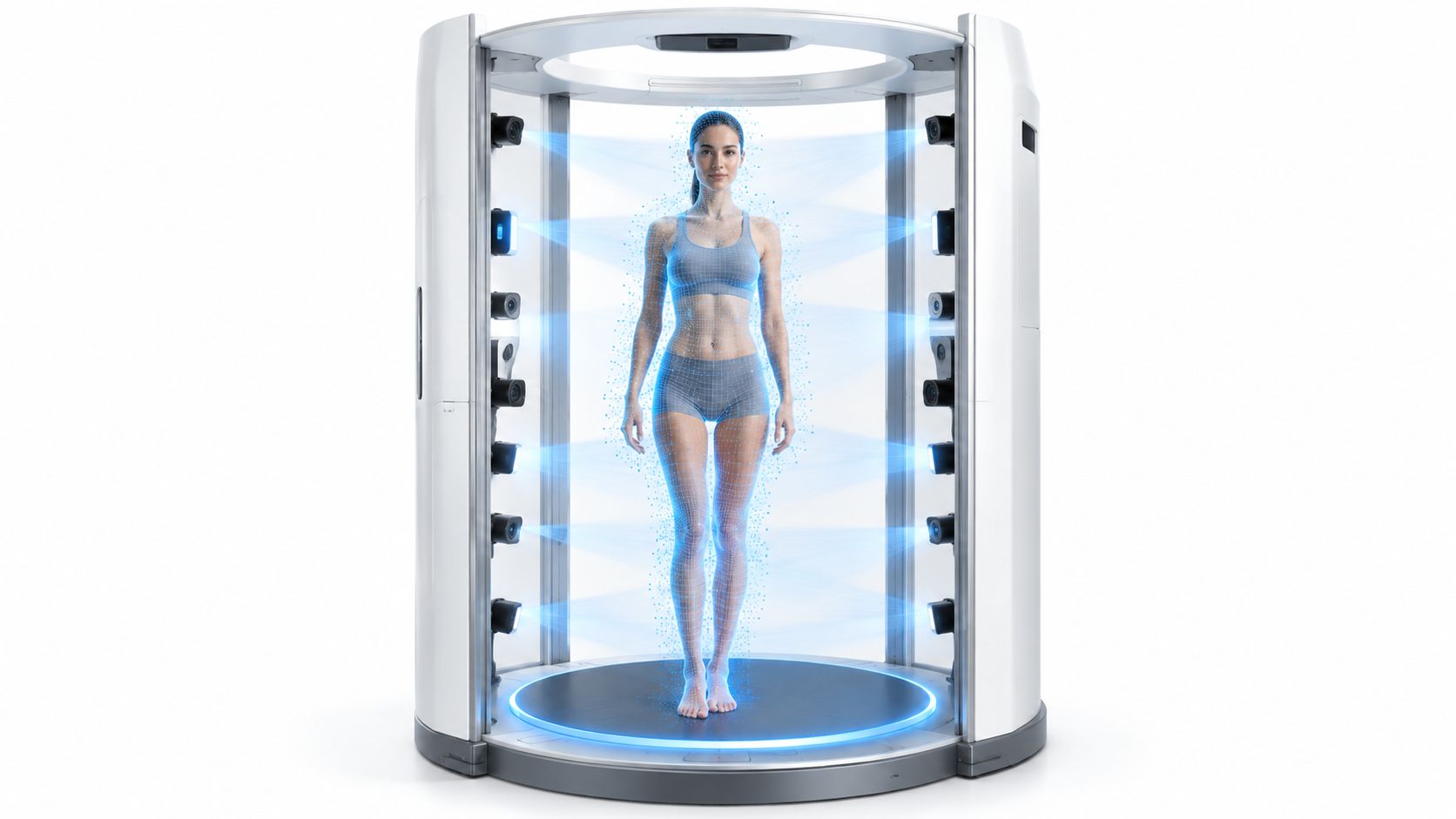
You're probably looking at a vendor deck, a sample try-on workflow, or a request from merchandising that says the same thing in different words, “we need better fit data.” The next question is the key one, because a scanner alone doesn't solve a catalog problem, it only creates a new kind of asset your team has to trust, clean, and connect to product imagery. That's why a full body scanner 3D matters to fashion ecommerce teams, it sits at the junction of measurement, content, and virtual try-on. If you want a broader view of how that fits into AI-generated fashion visuals, this overview of AI fashion model workflows is a useful companion.
Table of Contents
- Why Fashion Teams Are Looking at 3D Body Scanners
- What a Full Body Scanner 3D Actually Captures
- The Main Capture Technologies Used Today
- Turning a Raw Scan into a Try-On-Ready Asset
- How Accurate a 3D Scan Is in Real Conditions
- Connecting a Scan to a Virtual Try-On Pipeline
- Privacy, Accessibility, and What Users Will Actually Accept
Why Fashion Teams Are Looking at 3D Body Scanners
A merchandising lead usually doesn't ask for a scanner on day one. The request starts with a more visible pain, inconsistent fit complaints, too many returns, or campaign images that don't match how garments drape on different bodies. Then someone suggests body capture, and suddenly the team is evaluating hardware, file formats, and a promise that “virtual try-on” will make the catalog easier to scale.
That promise is only useful if the scan becomes something the rest of the workflow can consume. A brand doesn't need a science project, it needs a repeatable way to move from a real person to a digital body asset that can support size logic, avatar creation, and garment visualization. The core decision is not whether scanning sounds advanced, it's whether the output can survive production reality, where product pages, creative tooling, and model selection all have to line up.
Practical rule: ask what the scan will power before you ask what the scanner costs.
Fashion teams usually need to answer three questions at once. What should we capture? How accurate does it need to be? How does it connect to image generation or try-on tools? Those questions matter because a scan that's excellent for one workflow can be wrong for another, especially if you expect it to do both sizing and visual rendering without cleanup or normalization.
The useful mental model is simple, a scanner is not the finish line, it's the source asset. The rest of the article follows that path, from body capture to measurement to a try-on-ready body file that can support catalog work without turning your pipeline into guesswork.
What a Full Body Scanner 3D Actually Captures
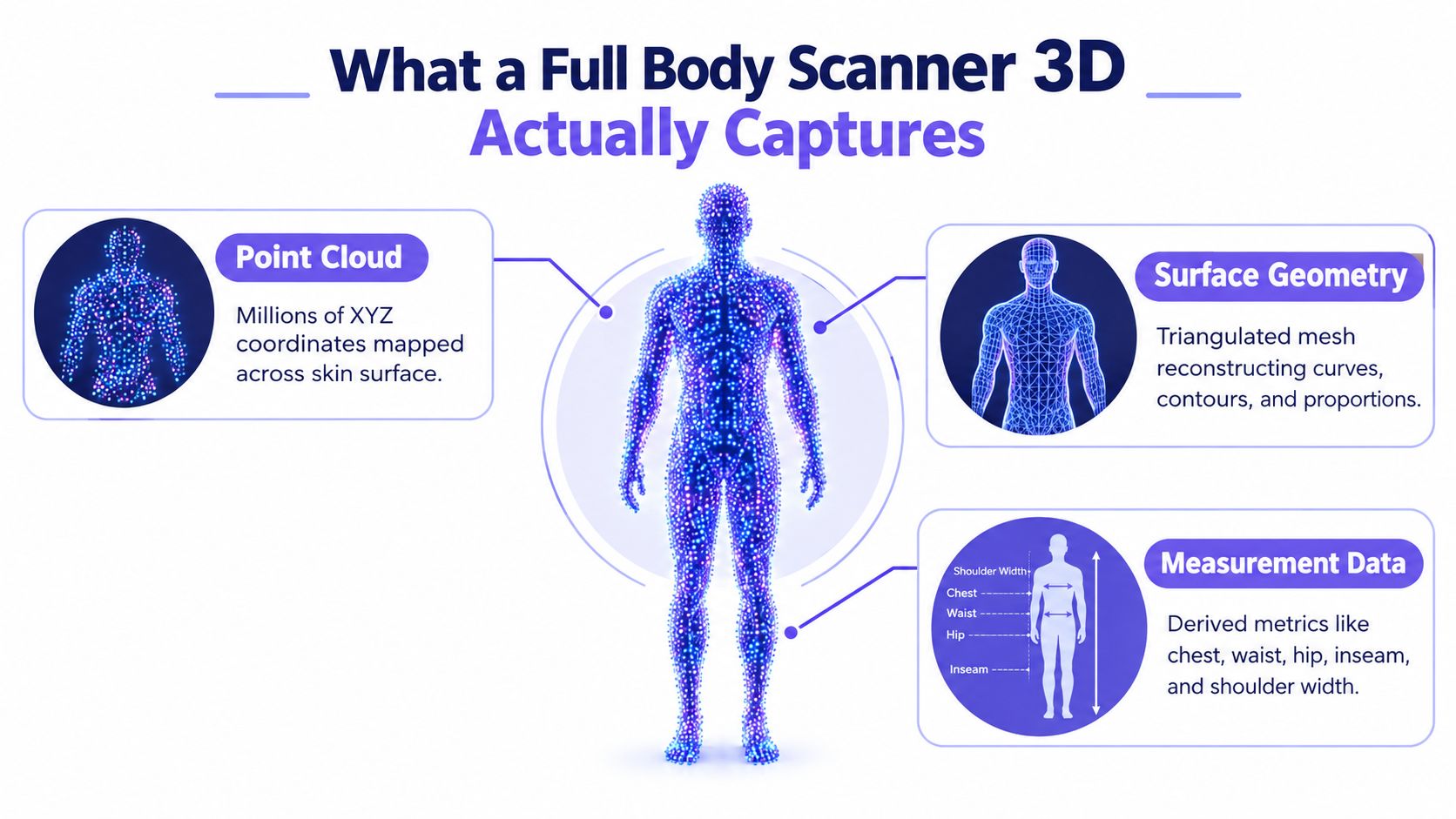
A full body scanner 3D system doesn't start with a tape measure. It starts by collecting a dense surface point cloud, which is just a large set of three-dimensional coordinates spread across the body in a very short time, then turning those points into a usable body representation. The important part for ecommerce is that the scanner isn't “seeing” clothing the way a camera does, it's building geometry that can later drive measurements and fit logic.
From points to a usable body file
A point cloud comes first, then software connects those points into a mesh, which is the surface structure your downstream tools can interpret. From that mesh, you can derive measurements such as chest, waist, hip, inseam, and shoulder width, provided the scan protocol is consistent and the body is captured cleanly.
The difference between a textured and untextured scan matters here. Texture is the color and surface appearance layer, which is what most privacy questions usually focus on. Measurement teams often care more about the geometry, while creative teams may care about whether the textured result is good enough to resemble the person in a rendered outfit.
A clean scan is not a finished product file. It's a structured body asset that still needs interpretation.
For fashion teams, “done” means more than a scan image exists. It means the vendor can deliver something your systems can use for measurement extraction, body normalization, and avatar or try-on generation without manual rework. If the output can't be named, stored, validated, and passed downstream, it's not a production asset yet, it's just raw capture.
The Main Capture Technologies Used Today
Fashion buyers usually encounter two capture families, and they behave very differently in a wardrobe workflow. One family is optical, built around structured white light or laser triangulation, where cameras and projectors map the body from multiple angles. The other is millimeter-wave imaging, which is better known from airport security than from apparel fitting.
Why apparel teams usually prefer optical systems
Optical triangulation is the common fit for garment workflows because it's designed to reconstruct surface form with enough detail for body shape and measurement work. It's also the approach most aligned with a controlled fitting room, where the subject can stand in a known pose while the system captures contours and proportions. That makes it more practical for building a catalog-ready process than a checkpoint-style sensor array.
Millimeter-wave systems serve a different purpose. They're useful when the goal is to detect concealed objects or capture through clothing in a security context, not to build a fashion mesh that cleanly supports garment drape or avatar styling. In clothing workflows, the challenge isn't just seeing a body, it's seeing it consistently enough to trust size and shape interpretation.
| Technology | How It Captures the Body | Strength for Apparel | Main Limitation |
|---|---|---|---|
| Structured light or laser triangulation | Surrounds the body with cameras and projected light to reconstruct surface geometry | Best for body shape, measurements, and fit workflows | Sensitive to posture, loose clothing, hair, and occlusion |
| Millimeter-wave imaging | Uses non-ionizing radio waves in the millimeter-wave spectrum to detect objects near the body surface | Useful for detection-oriented contexts, not apparel realism | Not optimized for detailed fashion mesh creation |
A good way to sanity-check vendor claims is to ask whether the output is a surface model or a detection image. Those aren't interchangeable, and a team that treats them as the same thing usually ends up with disappointing fit results. If you need a deeper look at capture setups that feed content workflows, this guide on 3D virtual tour camera systems helps frame how multi-angle imaging differs from ordinary photo capture.
Turning a Raw Scan into a Try-On-Ready Asset
Raw capture is only the first handoff. A fashion team still has to convert the scan into something standardized enough for measurement and rendering, and that means the protocol matters as much as the hardware. If the subject lifts an arm differently, relaxes their posture, or wears a bulky top, the output can shift enough to change how the garment pipeline interprets fit.
The production steps that actually matter
The first step is pose normalization, which aligns the body to a consistent anatomical stance. That matters because the same body can produce different dimensions if the arms are tucked, twisted, or slightly bent. Next comes landmark detection, where the software finds repeatable points on the body, such as shoulders, hips, and joints, so later tools can compare scans in a stable way.
After that, the scan needs mesh cleanup. The system removes holes, noise, and artifacts that came from motion, clothing compression, or occlusion. Only then does measurement extraction become reliable enough for fit logic, because the software is reading clean geometry instead of messy surface fragments. Texture mapping comes last when the workflow needs visual realism, not just measurement.
Production rule: a scan protocol should define stance, arm position, breathing state, garment tightness, and landmark rules before anyone starts collecting files.
That protocol is what keeps teams from treating every scan as equally trustworthy. A production setup should also reject scans that violate the capture rules, because fixing bad body data later is slower and more expensive than capturing it correctly once. For ecommerce, the practical win is not more scan volume, it's more scan consistency.
How Accurate a 3D Scan Is in Real Conditions
A scanner can look precise on the demo floor and still behave differently in a real capture room. Body position, clothing, lighting, and how much of the body surface the system sees all affect the result. For fashion teams, the useful question is simpler, accurate enough for which decision?
Point accuracy is not the same as sizing accuracy
Benchmarks matter, but only if you read them in context. An anthropometric study of the TC2 NX-16 white-light scanner reported point accuracy below 1 mm and circumference accuracy below 3 mm (an anthropometric study of the TC2 NX-16 scanner). A separate systematic review of 3D scan measurement repeatability found that repeated measurement differences were generally below 7 mm across the anthropometric measures it evaluated. That gives teams a useful baseline, but it does not mean every pose, body shape, or capture setup will behave the same way.
Why small measurement errors can still create bad fits
A scan can be geometrically clean and still miss the mark in apparel recommendation. Size charts may be loose, pattern rules may vary, and ease allowances can shift from one garment type to another. A fit process for stretch knitwear will not behave like one for structured blazers.
Point-level precision measures the body file. Sizing accuracy measures whether the recommendation logic matches how garments are made and worn.
That is why teams should evaluate scans by workflow stage. Ask about raw measurement error, repeatability across captures, and the conditions under which the result holds up. Then compare those results with your own product mix. A body scanner used for activewear does not need the same tolerance profile as one used for formalwear.
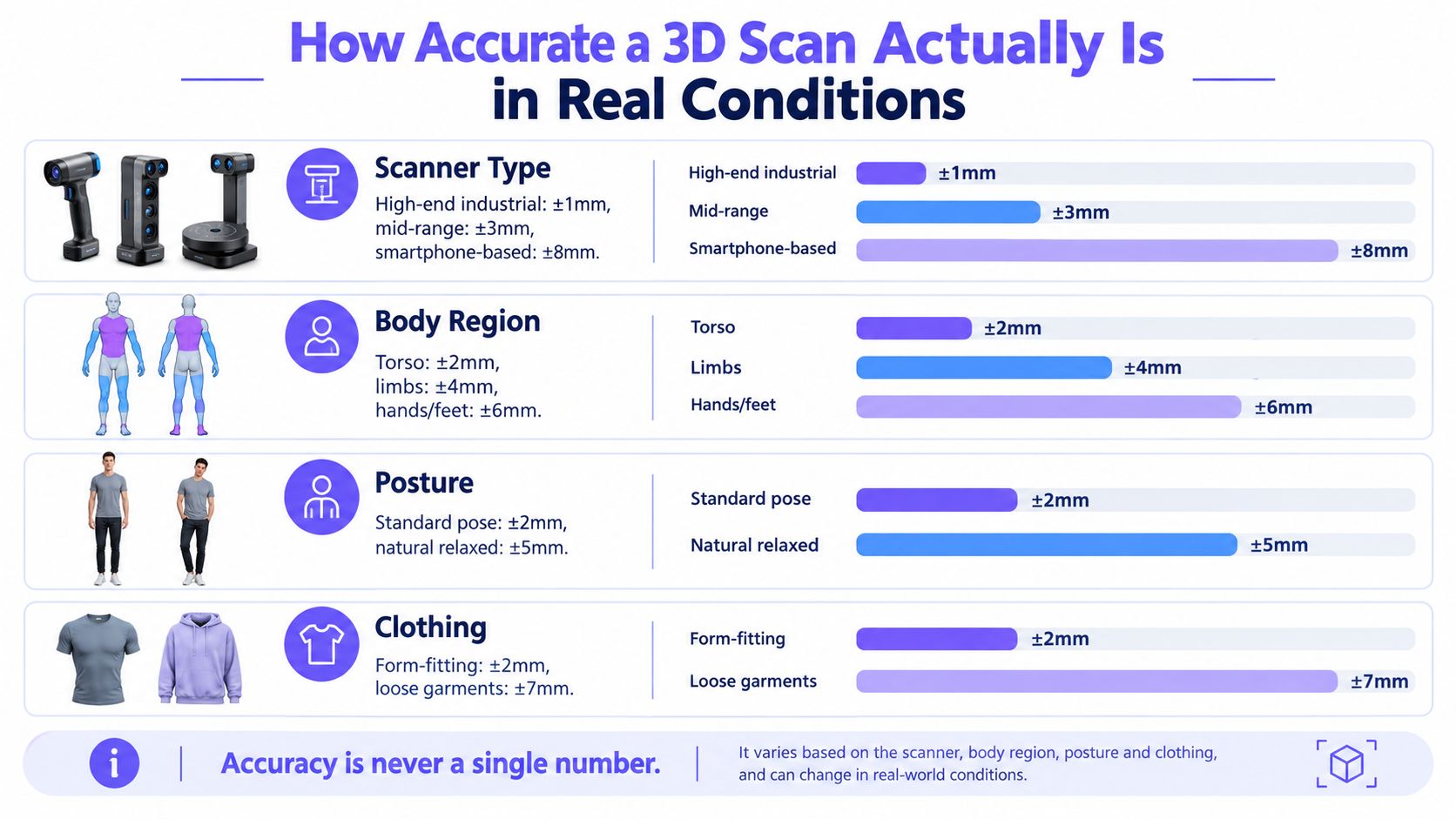
Accuracy is never one number. It is the outcome of the capture protocol, the measurement rules, and the sizing system that consumes the scan.
Connecting a Scan to a Virtual Try-On Pipeline
A scan adds value only when it reaches the rendering layer in a form the system can use. For a virtual try-on workflow, that usually means sending over normalized landmarks, key circumferences, posture cues, and confidence metadata, not just a pretty mesh. If the downstream model only receives a body shape without context, it has to guess more than it should.
What the handoff should include
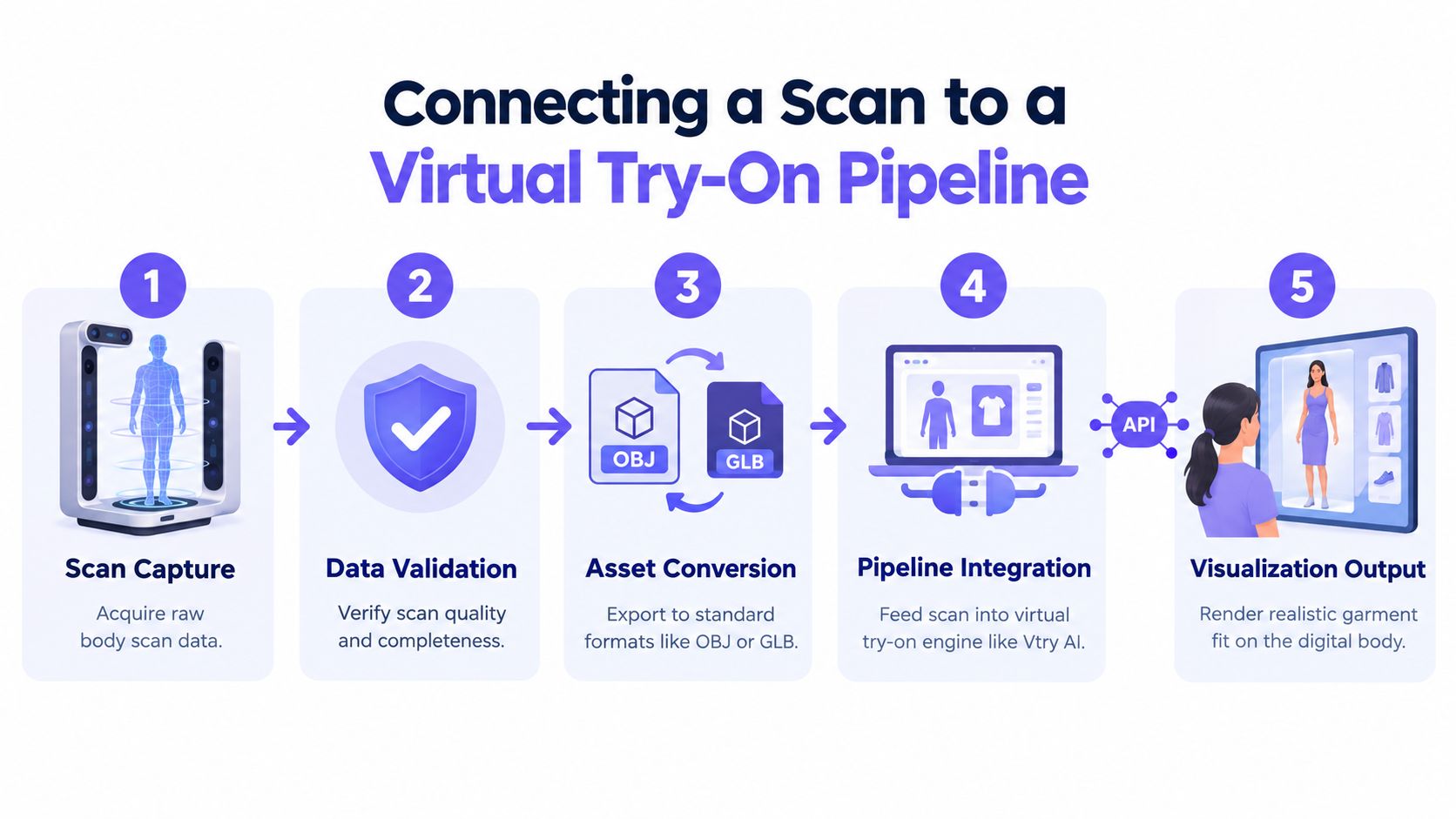
The scan file itself is only part of the package. Teams usually need a clean export such as OBJ or GLB, plus a measurement set that can be matched to garments and size logic. The more complete the handoff, the less time the creative and engineering teams spend trying to reconstruct intent from ambiguous files.
That matters because the image layer and the body layer do different jobs. The scan can support body-faithful proportions, while the try-on engine handles clothing rendering, pose matching, and the final visual result. In other words, the scan helps define the body, but the image system still has to solve garment appearance, fabric behavior, and visual coherence.
A good way to think about it is this:
- Scan capture: collects the raw body data.
- Data validation: checks completeness and quality.
- Asset conversion: packages the body into a usable format.
- Pipeline integration: feeds the asset into the try-on system.
- Visualization output: renders the final outfit image.
If you're evaluating a try-on workflow, don't ask whether the body scan can do everything. Ask whether it improves the parts that matter most, like fit confidence, avatar consistency, and downstream asset reuse. That's the distinction between a measurement tool and a working content pipeline.
For teams looking at a broader virtual try-on stack, this overview of virtual try-on workflows gives helpful context on how the rendering side usually absorbs the hardest visual work.
Privacy, Accessibility, and What Users Will Actually Accept
The hardest adoption problem is often not the scanner, it's the experience around it. People want to know what's captured, whether the image is stored, who can access it, and whether the process requires tight clothing or an exposed pose. That's true in ecommerce too, because a customer who feels watched will abandon the experience even if the output is technically excellent.
A scan carries several different privacy risks
A useful threat model starts by separating the data types. Temporary camera frames are different from derived measurements, which are different again from textured meshes and face data. Each one has its own privacy risk, its own retention question, and its own access policy.
Removing the face doesn't automatically make a body anonymous. Body shape, tattoos, scars, clothing, and metadata can still identify a person, so privacy controls need to go beyond face blur. The strongest systems make it clear whether the scan is processed locally or in the cloud, how long it's kept, and whether deletion is automatic or manual.
Accessibility matters as much as accuracy
Some users can't hold a pose easily, rotate on command, or wear tight-fitting clothing. Others may feel exposed by the process itself, which is why the adoption issue is partly physical and partly emotional. Research on 3D body photography found that patients generally viewed the technology positively, but privacy and shame still acted as barriers (source).
If the capture experience feels intrusive, better geometry won't save it.
That's also why there's a privacy versus reconstruction trade-off. Systems that rely on only front and side silhouettes can reduce exposure of visual data, but they add reconstruction complexity. In fashion terms, that means the team has to decide whether the workflow is optimized for maximum visual fidelity or for minimum exposure.
For a vendor review, ask for these decisions up front:
- Retention rules: how long each data type is stored.
- Access controls: who can view raw scans and derived data.
- Consent flow: what users agree to before capture.
- Capture requirements: clothing, posture, and movement constraints.
- Deletion process: whether users can remove their data cleanly.
The best scanning workflow is not just the one with the sharpest mesh. It's the one people will agree to use, repeatedly, without hesitation.
Vtry AI helps fashion teams turn people and garments into outfit images without rebuilding the whole content stack from scratch. If you're exploring how body capture, styling, and virtual try-on fit together in ecommerce, visit Vtry AI to see how the workflow comes together in one place.