headshot specs
Headshot Specs Guide: Sizes, Framing and Formats for 2026
Headshot specs for LinkedIn, websites, social profiles and ID photos: pixel sizes, aspect ratios, framing, backgrounds and file limits.
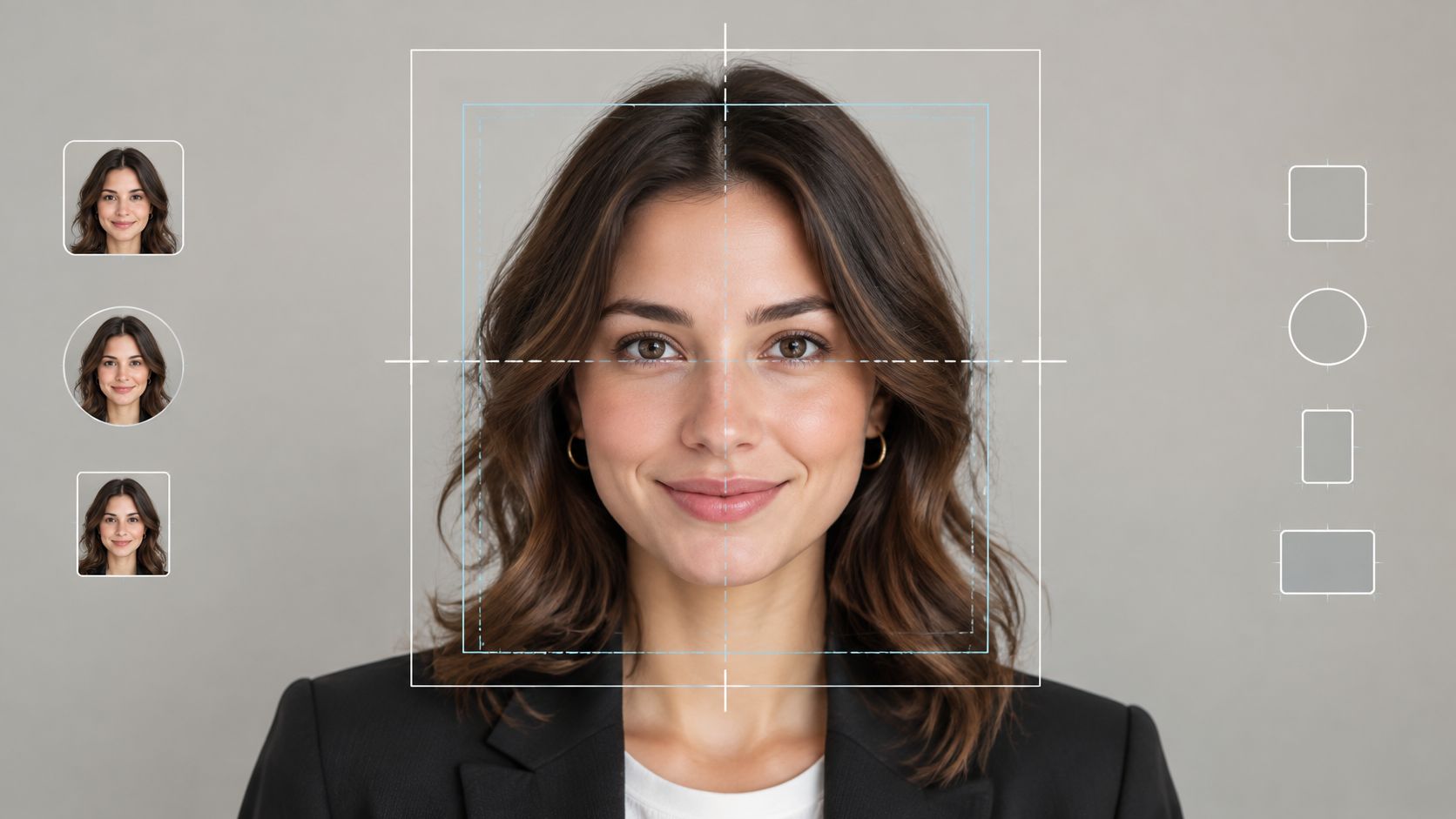
A U.S. digital visa image is refused when the head falls outside 50% to 69% of the image height, even if the file is sharp and square. Eyes are expected to sit about 56% to 69% of the height when measured from the bottom, on a file between 600 × 600 and 1200 × 1200 pixels. Those bands, set out in U.S. visa photo composition guidance, are the useful reframe for headshot specs: the crop decides whether a portrait survives, and the pixel count only decides whether that crop stays sharp.
The same face will be drawn as a circle on a professional profile, a rectangle on a staff page, a tiny recruiter thumbnail, and a taller speaker card. A file that meets one row can fail the next. The workable method is one safe-zone master, exports cut per destination, a check of circle and thumbnail crops, and a hard limit on edits that change identity or tilt how a person is judged.
Table of Contents
- Headshot Specs by Destination at a Glance
- Framing Measurements for Head Height and Eye Line
- How to Build One Master and Export Every Crop
- Background, Lighting and Attire Rules
- Pass or Fail Checks Before You Submit
- Why Uploads Get Rejected and How to Fix Each Cause
- Edits That Keep Headshots Accurate and Fair
- Confirm Your Spec Before You Upload
Headshot Specs by Destination at a Glance
Read the row for the place the photo will appear. Minimum pixels is the floor that avoids an outright reject or a mushy thumbnail. Recommended master is what you capture or generate, because a large file can be reduced and a small one can't be enlarged without softness. Aspect ratio is the shape you export, not the shape of the camera frame. Where a destination doesn't publish a file cap, the last column says to confirm it on that upload page.
| Destination | Minimum pixels | Recommended master | Aspect ratio | File limit and format |
|---|---|---|---|---|
| LinkedIn profile photo | 400 × 400 px | 1000 × 1000 px or larger | 1:1 (shown as circle) | 8 MB max, JPG or PNG |
| US digital visa image | 600 × 600 px | 1200 × 1200 px | 1:1 square | Confirm the current cap on the visa upload page |
| ICAO-style biometric portrait | 1200 × 1600 px | 1200 × 1600 px | 3:4 vertical | Confirm with the requesting authority |
| US passport print | 51 × 51 mm printed | Full print resolution, no visible printer dots | 1:1 (2 × 2 in) | Printed photo |
| Company website team card | 800 × 800 px | 1000 × 1000 px | 1:1 or 4:5 | Set by the site CMS; confirm before export |
| Social profile avatar | 320 × 320 px | 400 × 400 px | 1:1 | Set by the app; confirm before export |
| Speaker bio or feed portrait | 1080 × 1350 px | 1080 × 1350 px | 4:5 | Set by the host platform |
How to use a row
Pick the primary destination and read across. Don't treat the minimum as the delivery size.
LinkedIn's profile guidance accepts images from 400 × 400 pixels up to 7680 × 4320 pixels, with an 8 MB maximum, in JPG or PNG. A practical target is 1000 × 1000 pixels or larger. Desktop, mobile, and the circular mask all resample that file, and a file sitting on the floor goes soft as soon as a high-density screen enlarges it.
Visa guidance stops at 1200 × 1200 pixels on a square. The same identity family doesn't agree with itself on shape. The International Civil Aviation Organization portrait reference, cited alongside that visa range, recommends a minimum capture of 1200 × 1600 pixels. That's vertical, about 3:4, because biometric usability wants head and shoulders, not a tight square. A master built only as a tight circle can't grow into that vertical frame.
Passport print is a physical spec, 2 × 2 inches (51 × 51 mm), not a pixel upload. Website cards, social avatars, and 4:5 speaker or feed portraits in the lower rows are production targets, not a single published standard. Their file caps live on the destination's upload page, so leave a question mark off the sheet and check the page the day you export.
Which row sets the master
Let the strictest row you must serve set the capture. If a visa square and an ICAO-style vertical are both in scope, capture at 1200 × 1600 or larger with spare margin, then derive the square. If LinkedIn and a staff page are the only destinations, a 1000 × 1000 square master with shoulder room is enough, and you still cut a 4:5 variant from it rather than shooting twice.
Practical rule: Choose the primary destination's row now and carry its pixels, ratio, and file cap into the framing measurements. The master is sized to that row. Every other export is a crop of it, not a new portrait.
Framing Measurements for Head Height and Eye Line
Pixels don't place the face. Head height, horizontal center, and eye line do. Government identity photos turned those choices into measurements: a centered face, a straight-on pose, neutral presentation, and enough resolution to stay sharp. A business portrait doesn't have to match a passport, but the U.S. passport photo rules are the baseline most viewers already recognize.
| Destination | Head height | Face placement | Eye line | Notes |
|---|---|---|---|---|
| LinkedIn profile photo | 40–60% of frame | Centered, modest space above hair | Centered in the remaining headroom | Keep shoulders inside for the circle crop |
| US digital visa image | 50–69% of image height | Horizontally centered, straight-on | 56–69% from the bottom | Square, 600–1200 px |
| US passport print | 1–1⅜ in (25–35 mm), chin to crown | Horizontally centered, straight-on | Follows from the head-height band on a 2 × 2 in print | Plain white or off-white background |
| Company website team card | About 60–70% of frame | Centered | Keep eyes near the upper third of the card | Common guidance, not an official rule |
| Social profile avatar | Large enough to read at icon size | Face and shoulders centered | Eyes clear of the circular edge | Simple background with contrast at small size |
| Speaker bio or feed portrait | Head dominant, not edge-to-edge | Centered with headroom | Eyes above the vertical midpoint | 4:5 crop, keep shoulders in frame |
Why the bands disagree
Passport print fixes chin-to-crown at 1 to 1⅜ inches (25 to 35 mm) inside a 2 × 2 inch photo. That is a physical share of a tiny print, so the face must dominate or the officer can't compare it to the person. Visa digital files translate the same idea into percentages: head 50% to 69% of height, eyes 56% to 69% up from the bottom. Profile views and soft focus are rejected because the measurement assumes a front-facing, sharp face.
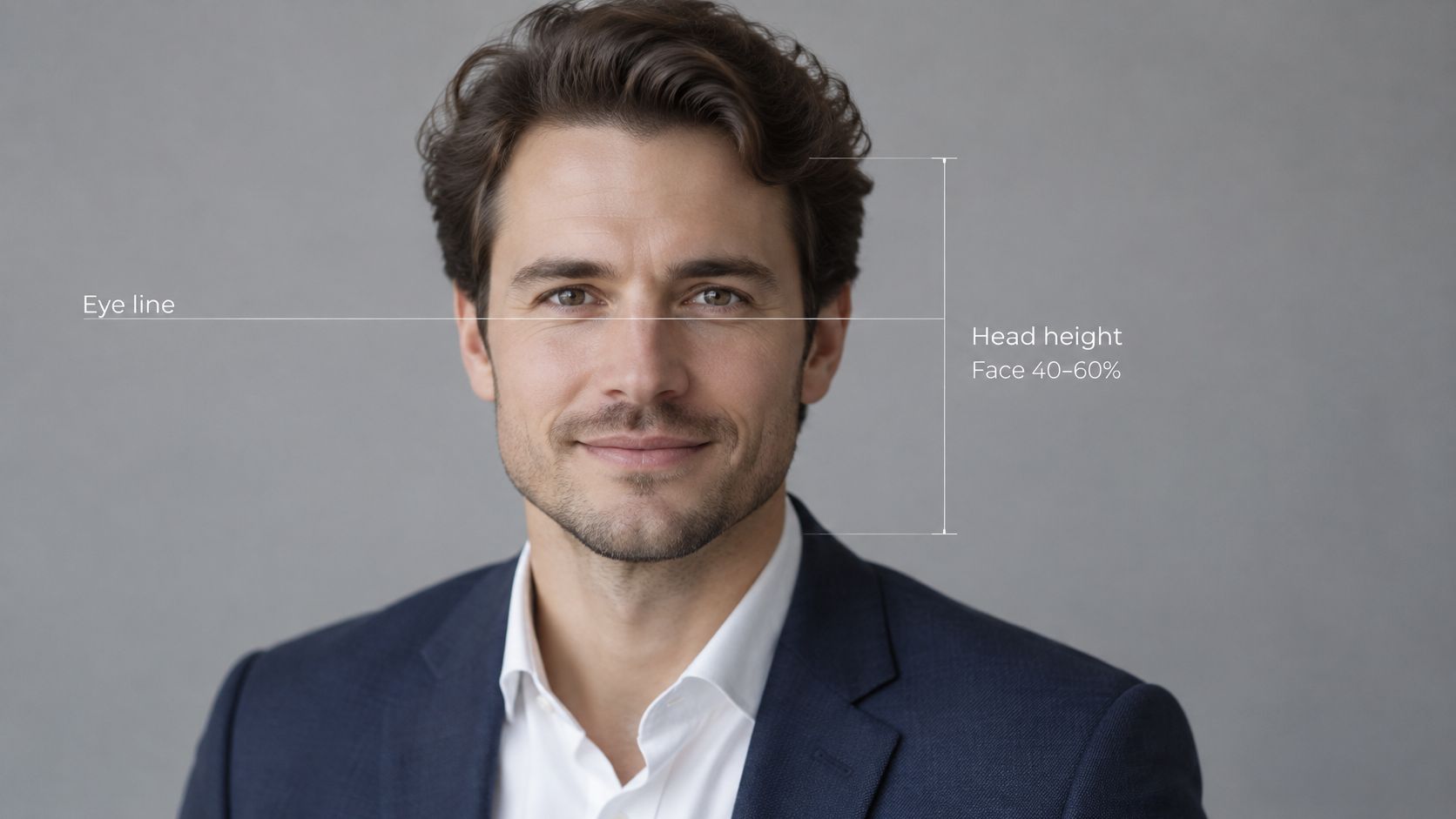
LinkedIn's working band is looser, about 40% to 60% of the frame for a head-and-shoulders portrait, centered, with modest space above the hair and enough shoulder to survive a circle. Staff-page guidance often pushes the face toward 60% to 70%. That figure is a layout habit, not a State Department rule. Use it when the card is a rectangle and people are compared side by side. Don't use it as the visa measurement.
How to measure
Divide chin-to-crown pixel height by total image height. Then check where the eyes sit as a percentage of height from the bottom edge.
On a 1000 × 1000 pixel square, a head that measures 550 pixels from chin to crown is 55% of the height. That sits inside the visa band and inside the LinkedIn band. If the eyes land near 620 pixels from the bottom, they're at 62%, inside the visa eye band. If the same head is 350 pixels tall, it's 35%, under the LinkedIn floor, and a thumbnail will read as a distant figure.
Leave headroom and shoulder width in the capture so you can change that percentage by cropping. Cutting in raises the head share. You can't add hair or a shoulder that was never in the frame. The same margin protects assistive devices and hairstyles that extend past the skull. Write the destination's head-height percentage on the shot sheet before anyone stands on the mark. A lighting setup that ignores that number produces a pretty frame that fails the row you already chose. Pose and light for that sheet are covered in a practical way in fashion photography for beginners.
How to Build One Master and Export Every Crop
One tightly cropped square is the failure mode. Hair, chin, shoulders, or background balance disappear the moment a second ratio is required. Build the master wide enough that every later crop is a cut, not a rescue.
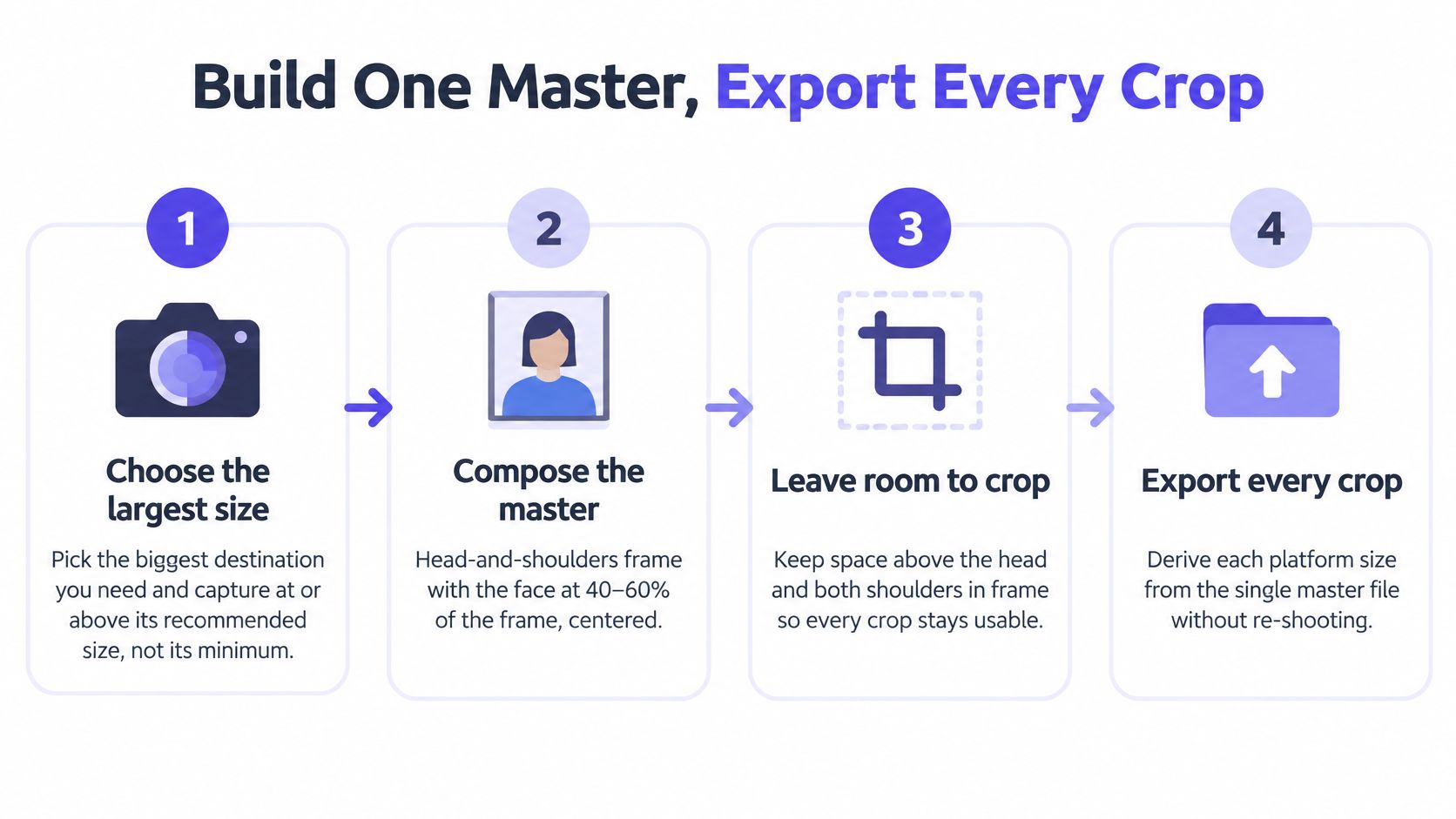
- Capture at the largest recommended size, not the minimum. If the strictest destination on your sheet is the vertical biometric frame, shoot or generate at that size or above. A file at the floor has no pixels left once you crop.
- Compose head and shoulders with the face in the framing band. Center the face and leave modest space above the hair. That share is the one already written on the shot sheet, so you aren't guessing a new percentage at export time.
- Keep a wide margin. The top of the head and both shoulders must survive a circle mask and a responsive thumbnail. A face that's too small, jammed against an edge, or cropped through the hair is the file that breaks first. Clothing and any assistive device need the same margin.
- Save an uncropped master. Use lossless PNG, or the highest-quality JPEG, at least the recommended master size from the destination table. This file is the archive. You don't upload it blindly, and you don't overwrite it.
- Derive every ratio from that approved master. Cut a 1:1 profile export, a 4:5 team-card or feed crop, and, when identity use is in scope, a 3:4 vertical portrait. Horizontal speaker banners come from the same source. One approved face, several shapes.
- Match format to the job. High-quality JPEG for ordinary web delivery. PNG when you need transparency or a lossless round trip. Keep each export under the destination cap already listed, including LinkedIn's ceiling.
- Never edit a variant back into the set. Later color or crop changes start from the master, so compression doesn't stack. The same discipline applies when you edit product photos online: the clean source stays untouched and the delivery files are disposable.
Upscaling a tight, soft crop doesn't restore the shoulder you cut off. Sharpness and composition are separate tests. Run the acceptance checks on every variant, not only the master: dimensions, file size, facial sharpness at thumbnail scale, a centered eye line, and whether the top of the head and the shoulders survive the crop that destination will apply.
Background, Lighting and Attire Rules
Passport and visa images require a plain white or off-white background, high resolution, and no blur, grain, pixelation, or printer dots. Even light is part of that spec because a cast shadow reads as a second shape behind the head. Profile, business, and social uses are looser, and pretending they're identical produces either a sterile staff page or a visa file that fails.
LinkedIn and similar profiles. A solid or softly blurred neutral ground is enough. One tone matters more than a specific paint chip, because the circle mask throws away the corners and any busy edge becomes a halo around the hair.
Company team cards. One brand-consistent color across the whole staff page. Mixed walls, mixed blur, and mixed color temperature make the grid look like a collage of different years. Record the color and reuse it for every person, including late hires.
Social avatars. Simple ground, enough contrast that hair and shoulders separate when the face is an icon. A light gray suit on a light gray wall vanishes at that size.
Identity prints and visa files. Stay on white or off-white. Don't substitute the brand color.
Light as a setup choice
Place soft frontal light at eye level, from a window or a diffused lamp. Strong side light splits the face and throws a shadow on the wall, which identity checks treat as a defect and which thumbnails turn into a dark half-face. Don't set a numeric exposure here. The pass-or-fail list later decides whether the result is even enough.
Attire that doesn't fight the crop
Solid colors or quiet patterns keep the face as the subject. Avoid large logos that compete once the frame is tight. Don't match the backdrop so closely that the shoulder edge disappears. If a collar, scarf, or assistive device merges with the wall at thumbnail size, change the ground or move the person off the wall. Cultural and religious clothing stays as the person wears it. Uniformity is about the set, not about dressing everyone alike.
Choose one background for the set, write down its color, and use it for every sitting. More destination-by-destination portrait choices are collected in these headshot recommendations.
Pass or Fail Checks Before You Submit
Resolution doesn't rescue a turned head, a second face, or glare on the lenses. NIST face-image quality guidance treats pose, light, focus, and occlusion as the quality problem. Apply the same list to a business portrait before upload. A near-frontal pose means within about ±5 degrees of roll, pitch, and yaw, with square shoulders.
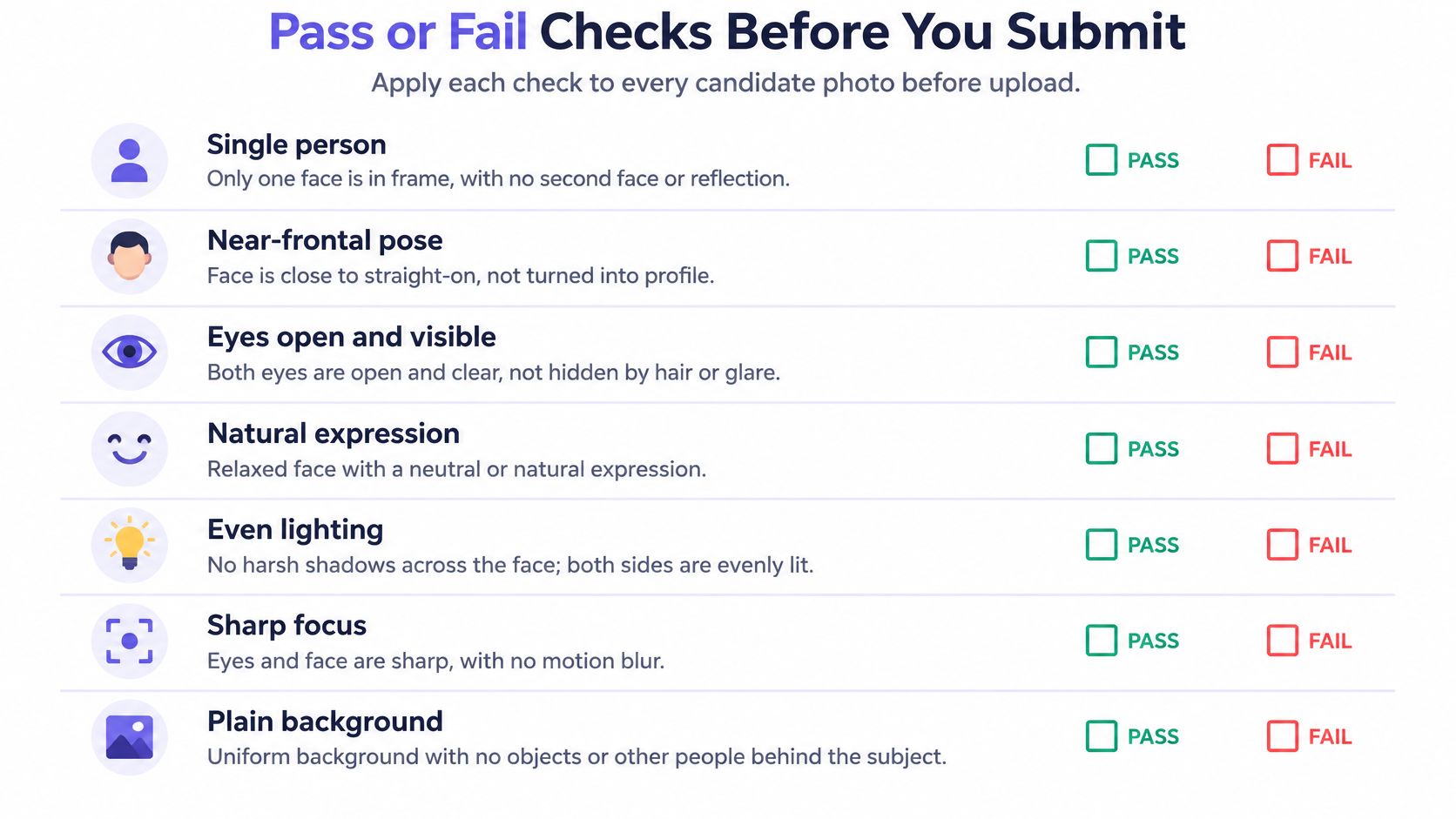
- Single person. A second face, including a reflection or a poster, gives an identity check two subjects. Crop only if the remaining frame still has margin. Otherwise reshoot.
- Near-frontal pose. Roll, pitch, and yaw stay inside about five degrees, shoulders square. A flattering three-quarter turn fails biometric comparison and often fails a circle crop by hiding one eye.
- Even illumination. No strong side light and no hard cast shadow. Uneven light changes how skin and jaw read once the file is small.
- Full facial region. Crown to chin and ear to ear stay visible. Heavy hair or accessories that cover landmarks get rejected because the landmarks are the measurement.
- Eyes clear. Irises and pupils are visible. Glasses must not throw flash glare or hide the eyes. Reflective eyewear is a retake, not a clone-stamp job.
- Sharp from nose through ears, chin through crown. Motion blur and a focus plane that misses the eyes fail at thumbnail size even when the full file looks acceptable.
- Neutral or controlled expression. Identity matching assumes a stable face. A big laugh changes the jaw and the eye shape you're about to compare.
The short version of that list is easier to run on set if you watch the pass-fail walkthrough once, then keep the sheet in the room.
Generated output
If the portrait was generated, compare it to the reference before anyone approves it. Check eye spacing, jaw contour, skin texture, hairline, and asymmetrical features. Do that at full resolution and again at a small mobile preview. Artifacts that are subtle on a large file become obvious once the face is reduced.
Any miss on identity, focus, or occlusion means a reshoot or a new generation from the source. A miss on framing or file size is usually a re-export or a re-crop from the master.
Why Uploads Get Rejected and How to Fix Each Cause
Most rejects collapse into four causes: the file is over the platform cap, the master is too small or crushed by compression, the composition dies under an automatic crop, or background, pose, or glare breaks the identity checks. Guides that stop at "square, JPG or PNG" miss that split. Cross-platform headshot practice keeps running into the same gap: one portrait is a circle, a team card, a recruiter thumbnail, and an avatar, and a sharp file still fails when the interface crops it.
| Symptom | Likely cause | Fix |
|---|---|---|
| File rejected for size | Export exceeds the platform limit (LinkedIn's cap is the one already listed) | Re-export as high-quality JPG under the limit |
| Face looks soft at thumbnail size | Under-resolution master or heavy compression | Export from the uncropped master at the recommended size or larger |
| Head or shoulders cut off in a circle crop | Tight crop with no margin | Recompose with shoulders and headroom inside the safe zone |
| Face too small to read | Head under the LinkedIn share of the frame | Crop closer, keeping the top of the head and the shoulders |
| Visa photo refused for head size | Head outside the measured height band | Reframe to that band |
| Glare hides the eyes | Reflective lenses or flash | Retake without glasses, or with anti-reflective lenses |
| Shadow or uneven background | Cast shadow or cluttered backdrop | Reshoot on a plain, evenly lit ground |
| Second person visible | Group photo used as the source | Crop to one face, or reshoot if the edge is too tight |
Re-export versus retake
Size and softness are export problems when the master still has pixels. Re-save a JPEG under the cap, or re-export from the uncropped master. Don't upscale the thumbnail you downloaded from a chat thread. Upscaling doesn't invent the detail compression removed, and it doesn't fix composition.
Circle cuts and a face that's too small are crop problems. If the master still contains hair and shoulders, cut a new safe-zone square. If the original framing already sliced the crown, that's a retake. The same photo can pass a tall staff card and fail a circular avatar, so run this table once per destination, including a thumbnail preview on a phone.
Glare, cast shadows, and a second face don't yield to cropping unless the obstruction is fully outside the head. Glasses flare and wall shadows mean another sitting, with the light moved to the frontal setup already chosen for the set.
Re-export or retake, then run the pass-or-fail list again on the new file. A fix that isn't rechecked tends to trade one reject for the next.
Edits That Keep Headshots Accurate and Fair
A cleaner file isn't automatically a fairer one. A 2025 study found that participants rated candidates with high facial attractiveness more favorably than candidates with low facial attractiveness, and its authors recommended separating early resume review from visual cues. Research in the Oxford Review of Economic Policy found a related split: incentives to include or omit a photograph varied by context, and minority women, but not minority men, faced appearance-related trade-offs in job applications, as summarized with that study in the 2025 attractiveness and hiring research. A polished headshot isn't a universal career good. It can change the evaluation.
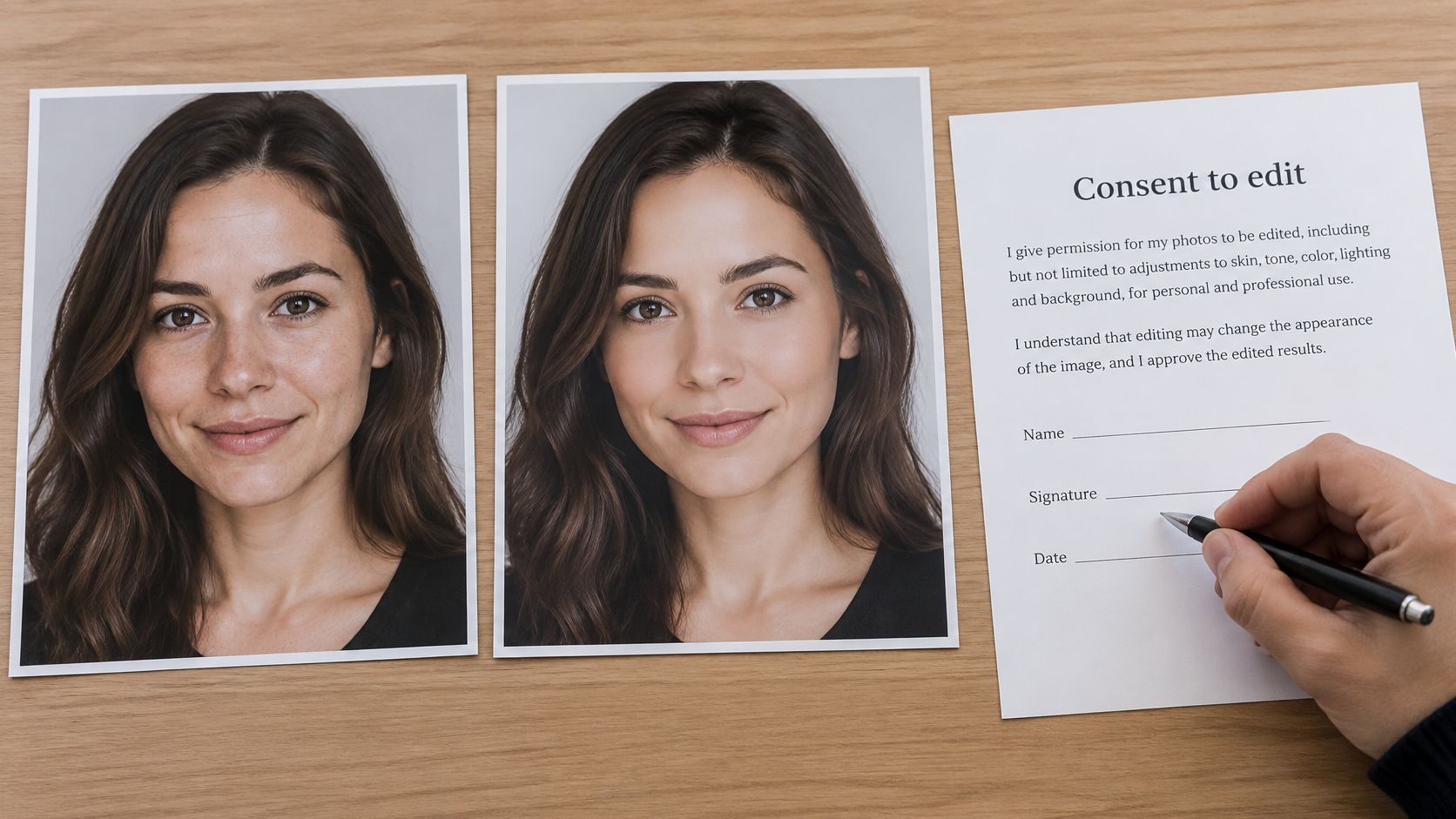
Enhancement versus a changed person
Identity-preserving enhancement is lighting, background cleanup, framing, and resolution. The person is still recognizable at a glance, including marks, hairline, and asymmetry you already checked against the reference.
Appearance-changing modification shifts apparent age, skin tone, facial features, cultural clothing, disability-related appearance, or gender presentation. That can mislead a viewer and feed the attractiveness gap the study measured. Treat it as out of spec for a professional portrait, even when the pixels and the crop are perfect.
A rule set you can put on the shot sheet
- Consent. The person agrees to the sitting and to the edit level before generation or retouch.
- Disclosure. Say when a portrait was AI-assisted, where the audience would reasonably want to know.
- Recognizable identity. Eye spacing, jaw, skin texture, and hairline still match the reference.
- Neutral, adaptable styling. Offer options that don't force one cultural look.
- A minimal-edit version. Keep it beside any enhanced file so the person can choose the quieter one.
If an application doesn't require a photo, don't put one in front of the first screeners. Public directories and customer-facing roles are different: the photo is the point, so accuracy matters more, not less. Choose the edit tier before you generate, and write it on the shot sheet next to the destination row.
Confirm Your Spec Before You Upload
Work the sheet in order. Skipping to export is how a file that's "close enough" fails the one check you didn't write down.
- Copy the primary destination's pixels, aspect ratio, and file cap from the first table.
- Copy that destination's head-height band and eye line from the framing table, and note the background color for the set.
- Shoot or generate the master at the recommended size, with safe-zone space around hair and shoulders. In our studio, Professional Headshots turns everyday photos into clean, studio-style portraits so a team isn't waiting on a shared lighting day. Use 1K when you're still drafting, because it's faster and spends fewer credits, 2K when the file is a catalog or social visual that needs to stay sharp, and 4K only for the final asset.
- Run the pass-or-fail list, then open the smallest crop at thumbnail size and confirm the face, the eyes, and the shoulder line.
- Export the secondary ratios from that same master and walk the rejection table once per destination.
Upload only when the master matches the destination row and every check passes. If it doesn't, go back to the framing measurements and fix that cause before you export again.
Vtry AI's Professional Headshots turn everyday photos into clean, studio-style portraits sized for the crops this sheet covers, from a square profile to a taller staff or speaker frame. You keep one master, export the variants, and hold the edit to lighting, background, and framing so the person stays recognizable. Build the next set in Vtry AI.